What's New at Kavout — August 2026
August was about giving you more control. More control over how your portfolio gets into Kavout, more control over what our research agents actually look at, and a chat experience that remembers where you left off — and what matters to you.
Here's everything that shipped this month.
1. Upload your holdings from any brokerage
Until now, connecting a portfolio meant linking one of our 30+ supported brokers directly. That covers most people, but not everyone — some brokers aren't on the list, some accounts can't be linked, and some of you simply prefer not to connect an account at all.
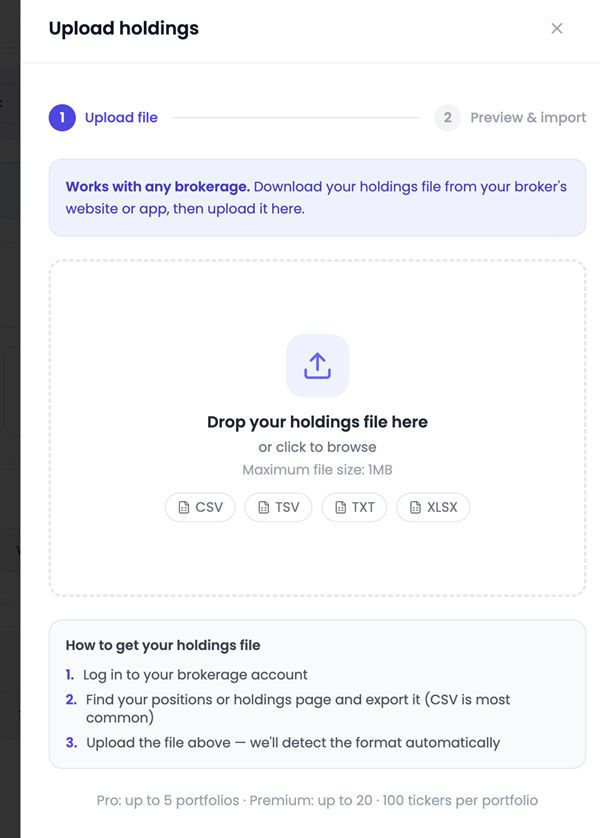
So we added file upload. Export your positions from your broker, drop the file into Kavout, and you're done.
What you should know:
- CSV, TSV, TXT, and XLSX are all supported — whatever your broker exports
- Format detection is automatic. You don't need to rename columns or reorder anything first
- Preview before you import. Step two shows you exactly what Kavout parsed, so you can catch problems before they land in your portfolio
- Maximum file size is 1MB, which is far more than a holdings export needs
- Pro supports up to 5 portfolios, Premium up to 20, with 100 tickers per portfolio
Once uploaded, your holdings work exactly like a linked account — K Score coverage, risk breakdowns, portfolio-level research, and alerts all run against them.
👉 Try it at kavout.com/my-portfolios
2. Custom instructions for every research agent
Our research agents are good at running a thorough, general analysis. But "general" isn't always what you want. A swing trader watching a volatile small-cap has different priorities than someone sizing a long-term position, and until now the agent couldn't tell the difference.
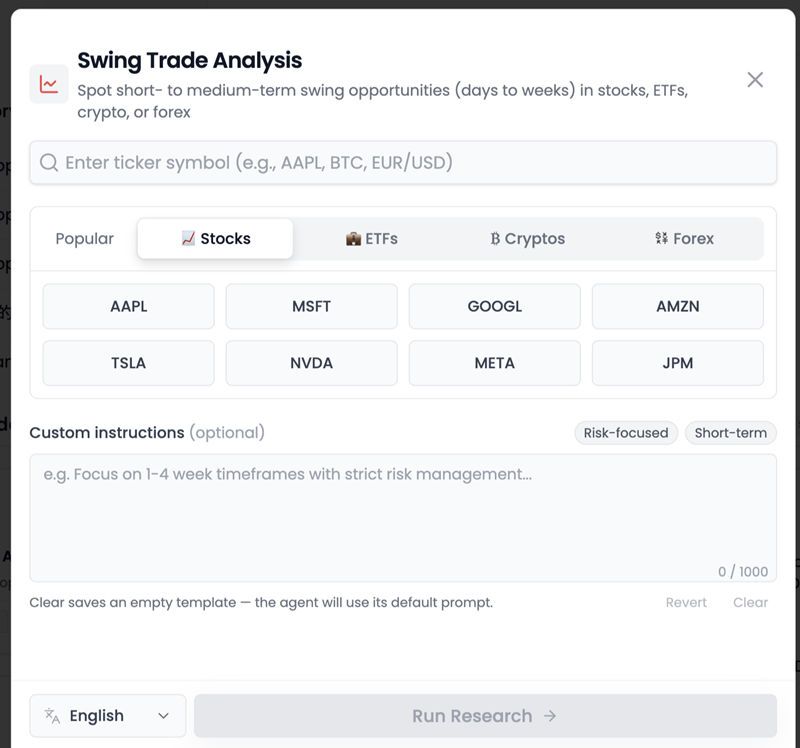
Now it can. Every research agent has a Custom instructions field where you tell it what to focus on.
Some examples of what you can write:
- "Focus on 1–4 week timeframes with strict risk management and explicit stop levels."
- "Weight the technical setup more heavily than fundamentals. Flag any earnings date inside the holding period."
- "Compare against sector peers before recommending an entry."
A few details worth knowing:
- Preset chips like Risk-focused and Short-term give you a starting point in one click
- Instructions are saved as a template per agent, so your preferred framing carries over to the next run — no retyping
- Clear resets the template and returns the agent to its default prompt; Revert undoes your edits
- You get up to 1,000 characters — enough to be genuinely specific
This works across the whole agent library, not just Swing Trade Analysis.
👉 Try it at kavout.com/research
3. InvestGPT: chat history on the same screen
Small change, big difference in daily use. Your conversation history now lives in a sidebar right next to the chat, instead of behind a separate page.
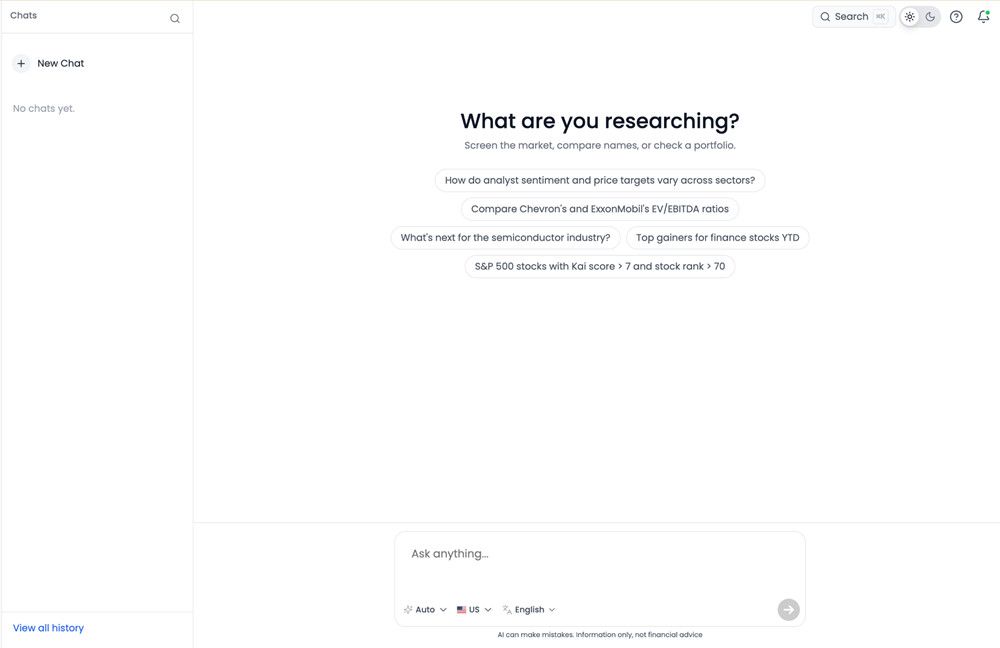
You can jump between threads without losing your place, search past conversations from the top of the sidebar, and start a new chat without navigating away. If you tend to run several research threads in parallel — one per name you're watching, say — this makes switching between them essentially free.
👉 Try it at kavout.com/investgpt
4. InvestGPT now remembers you
The bigger InvestGPT change is under the hood: we added long-term memory.
Previously, every conversation started from zero. If you'd spent last week explaining that you run a concentrated dividend portfolio and don't care about momentum signals, you'd be explaining it again this week.
Now InvestGPT carries context forward across conversations. It remembers your preferences, the names and sectors you follow, and how you like answers framed — and it brings that context into each response automatically.
In practice this means:
- Fewer repeated setups. You don't re-establish your investing style at the start of every session
- More relevant answers. A question about "the semis" resolves against the names you actually track
- Better continuity. Follow-up questions days later still land in the right context
The result is an assistant that gets more useful the more you use it, rather than resetting to a stranger every time you open a new chat.
What's next
We're heads-down on the Kavout mobile app, targeting a September launch — the same portfolios, agents, and alerts you use on the web, in your pocket.
As always, if something in this release doesn't work the way you expect, or you want an agent to do something it currently can't, tell us. Most of what shipped this month started as a user request.
Information only, not financial advice.