 Academy
Market Movers
Real-time global market movement tracking — who's up, who's down, who's hitting new highs/lows — find trading opportunities before anyone else.
📌 What is Market Movers?
Market Movers is a real-time market movement monitor that helps you quickly answer:
- 📈 Which stocks are up the most today?
- 📉 Which stocks are down the most?
- 🚀 Which stocks are hitting 52-week highs? (potential breakout signals)
- 📉 Which stocks are hitting 52-week lows? (potential oversold bounce opportunities)
It covers four asset classes — stocks, ETFs, crypto, forex — supports multiple global markets, and updates intraday data every 30 minutes.
Core value: in a sea of market information, it helps you quickly lock in "what's happening right now" and find picks worth deeper research.
🚀 Quick Start: 3 Steps to Find Your Opportunities
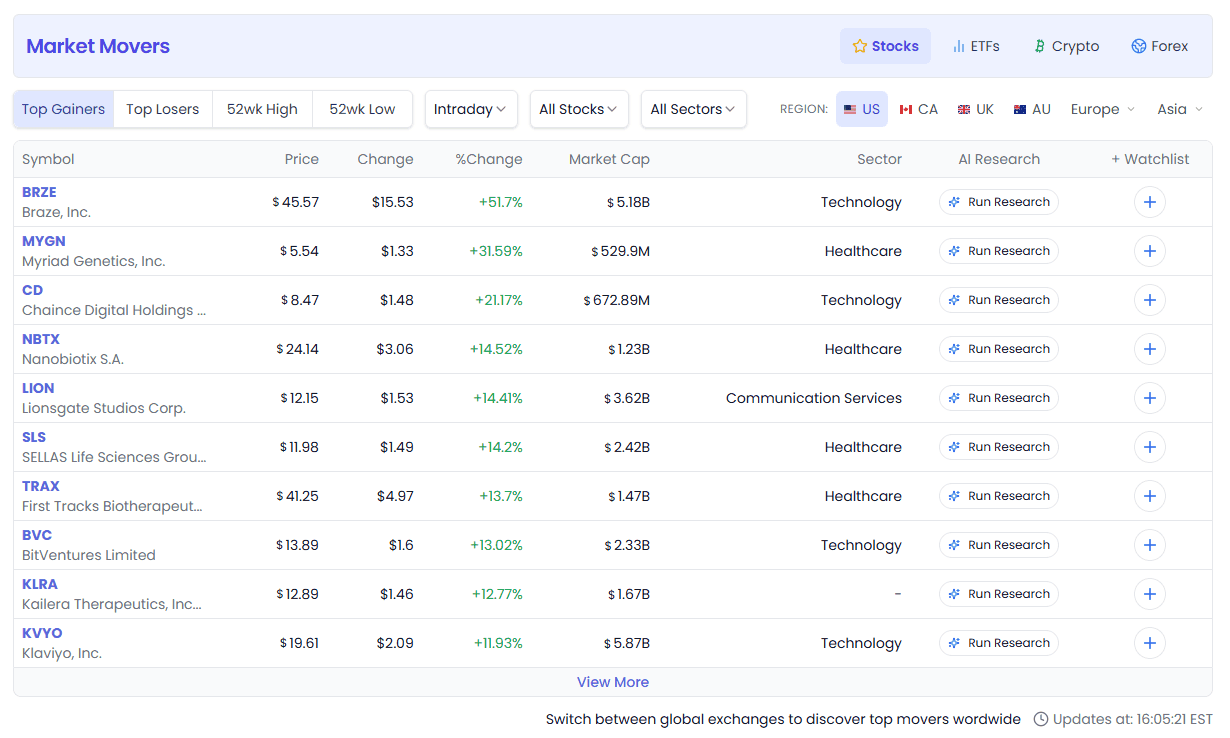
Step 1: Choose an Asset Class
The top navigation bar has 4 categories — click to switch:
| Category | Icon | Description |
|---|---|---|
| Stocks | ⭐ | Individual stocks — most commonly used, covers major global markets |
| ETFs | 📊 | Exchange-traded funds |
| Crypto | ₿ | Cryptocurrencies, 24/7 global trading |
| Forex | 🌍 | Foreign exchange currency pairs |
💡 Beginners should start with Stocks — it has the most complete features.
Step 2: Choose a Movement Type
Tabs in the middle of the page, 4 options:
| Type | What to See | Typical Use |
|---|---|---|
| Top Gainers | Biggest gainers | Find today's hot sectors and strong stocks |
| Top Losers | Biggest losers | Find oversold bounce opportunities, avoid pitfalls |
| 52wk High | 52-week new highs | Find strong stocks with breakouts |
| 52wk Low | 52-week new lows | Find deep value, turnaround plays |
Step 3: Set Filter Conditions
To the right of the type tabs is a row of filters (left to right):
- Timeframe:
Intraday(real-time) /Prev. Day(previous trading day) - Filter: limit movements to a specific index/universe (e.g. only S&P 500 constituents)
- Sector: only show movers in a given sector (available only for Stocks + All Stocks)
- Region: switch markets — US, Canada, UK, European countries, Asian countries, etc.
Once set, the table below shows your results.
📊 Page Features in Detail
Top Category Bar
The purple banner at the very top — Market Movers title on the left, four asset class switch buttons on the right. The currently selected category is highlighted.
When switching categories, the system handles things smartly:
- Switching from Crypto to Stocks automatically resets the filter to
all-stocks - Switching from Stocks to ETFs auto-switches to the US market if the current region doesn't support ETFs
- Your region preference is remembered and used automatically next time you open
Movement Type Tabs (Top Gainers / Losers / 52wk High / 52wk Low)
These four tabs are the core perspective of Market Movers:
📈 Top Gainers
Sorted by gain percentage descending. Good for:
- Discovering today's market hotspots and strong sectors
- Finding short-term momentum trading opportunities
- Seeing which stocks are driven by positive news
📉 Top Losers
Sorted by loss percentage descending. Good for:
- Finding oversold assets, looking for bounce opportunities
- Avoiding stocks with major bad news
- Reverse thinking — are any of the big losers being unfairly punished?
🚀 52wk High
Stocks hitting one-year highs. Good for:
- Finding strong breakout stocks ("strength begets strength" effect)
- Confirming whether an uptrend is continuing
- Use with momentum strategies
💡 Hitting a 52-week high often means no overhead resistance from trapped buyers — less friction on the way up. But be careful: chasing highs has risk — recommend combining with fundamentals.
🏔️ 52wk Low
Stocks hitting one-year lows. Good for:
- Deep value investors hunting for "bargains"
- Stock pool for turnaround strategies
- Observing which sectors/companies are going through a cold spell
⚠️ Many stocks at 52-week lows have fundamental problems. Don't buy just because "it's dropped a lot" — always understand why it's falling.
Filter Row in Detail
To the right of the movement type tabs is a row of filters (3-4 dropdowns, left to right):
1. Timeframe
| Option | Description | Use Case |
|---|---|---|
| Intraday | Real-time intraday data, updated every 30 minutes | Daytime monitoring, finding same-day trading opportunities |
| Prev. Day | Previous full trading day data | Pre-market research, viewing full-day movements |
📌 Intraday data for stocks/ETFs starts about 1 hour after US market open (~10:00 AM EST) — needs enough data to be meaningful. Crypto updates 24/7 in real time.
2. Filter
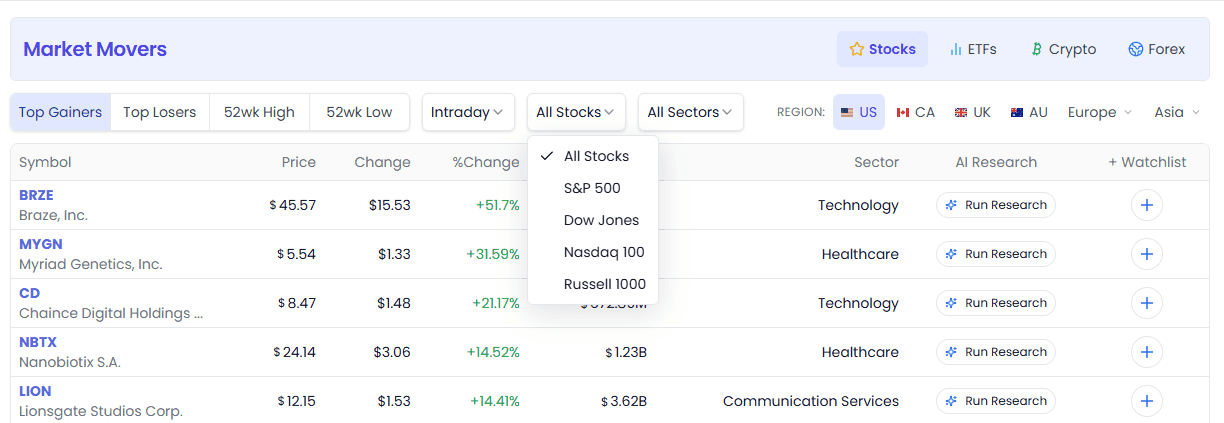
Stocks mode (U.S.):
All Stocks— all stocksS&P 500— S&P 500 constituents onlyDow Jones— Dow Jones Industrial Average constituents onlyNasdaq 100— Nasdaq 100 constituents onlyRussell 1000— Russell 1000 constituents only
For non-U.S. markets, the filter becomes
Top 500/Top 1000(top 500/1000 stocks by market cap)
ETFs mode:
All ETFs (Incl. Leveraged)— all ETFs, including leveraged ETFsAll ETFs (No Leveraged)— no leveraged ETFs (more conservative)
Crypto mode:
All Cryptos— all cryptocurrenciesPenny Cryptos (<$1)— small-cap coins under $1Prices Over $1— priced above $1Prices $1 to $50— priced $1–50Prices Over $50— priced above $50
Forex mode:
All Forex— all currency pairs
3. Sector Filter
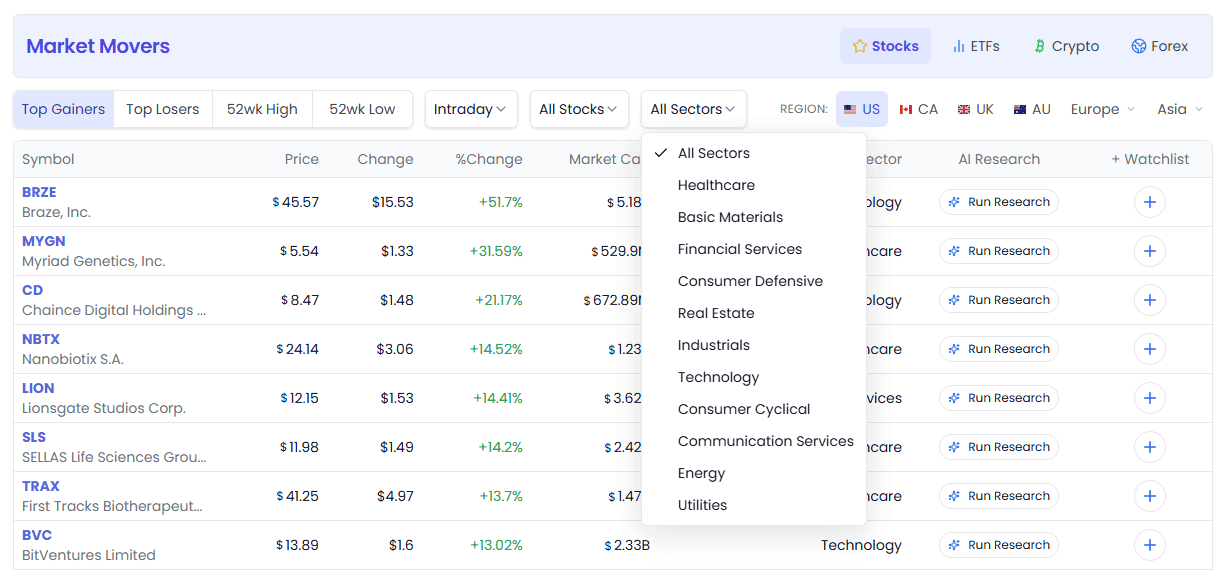
Only appears in the Stocks + All Stocks combination. Lets you view movers in just one sector, e.g.:
- "Which tech stocks are up the most today?"
- "Are energy stocks generally falling?"
Sector list includes: Technology, Healthcare, Finance, Consumer Cyclical, Energy, and a dozen more.
4. Region Selector
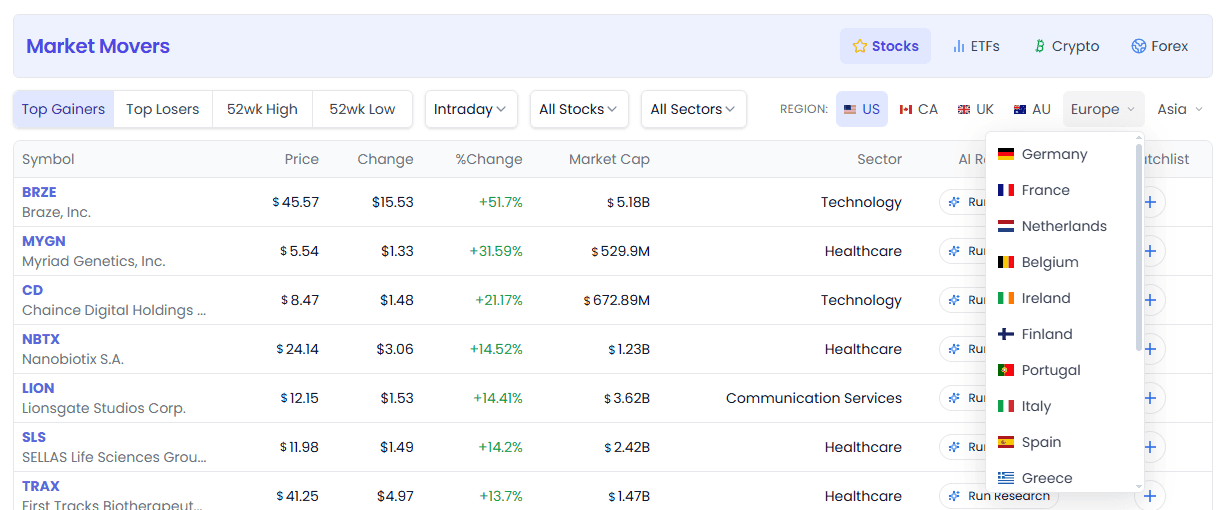
The rightmost filter in the row — switch markets for different countries/regions:
| Region | Description |
|---|---|
| 🇺🇸 US | U.S. stock market (default, most comprehensive data) |
| 🇨🇦 CA | Canada |
| 🇬🇧 UK | United Kingdom |
| 🇦🇺 AU | Australia |
| 🇪🇺 Europe | Germany, France, Netherlands, Switzerland, Sweden, etc. |
| 🌏 Asia | China, Hong Kong, Japan, India, Southeast Asia, etc. |
💡 Some regions aren't available in ETF mode (e.g. Hong Kong, Southeast Asia, Taiwan) — the system auto-switches to an available region.
Results Table in Detail
The table is Market Movers' core display area. Each row represents one stock/ETF/crypto/currency pair.
Desktop Columns
| Column | Description | Sortable |
|---|---|---|
| Symbol | Ticker + company name (hover for full name). Click to open detail popup | Yes, by ticker |
| Price | Current price (with currency symbol) | Yes, by price |
| Change | Absolute price change (e.g. +$2.35) | Yes |
| %Change | Percentage change. Green = up, red = down | Yes |
| Market Cap | Market capitalization (with currency unit). Not shown in Forex mode | Yes |
| Sector | Sector. Only shown in Stocks mode | Yes |
| AI Research | AI research button, click to expand AI analysis tools | — |
| + Watchlist | Add to watchlist button | — |
🔒 Free users only see the first 10 results. Clicking "View More" at the bottom takes you to the Pro upgrade page. Pro users see full results and can click "View More" to load additional rows (25 at a time).
Mobile Version
On mobile, the table is streamlined:
- Symbol column stays (ticker + name)
- Originally multiple columns (price/change/market cap/sector) merge into one switchable column — a dropdown at the top lets you pick which metric to display
- AI Research and +Watchlist remain
Click the dropdown in the column header to switch between:
- Price
- %Change
- Change
- Market Cap
- Sector
Data Update Time
"Updates at: ..." is shown in the top-right of the table, telling you when the data was refreshed.
- If it says
Intraday updates will be available around 1 hour after market open, intraday data isn't ready yet - At those times, you can click the link in the prompt to see full data for the previous trading day
AI Research Button
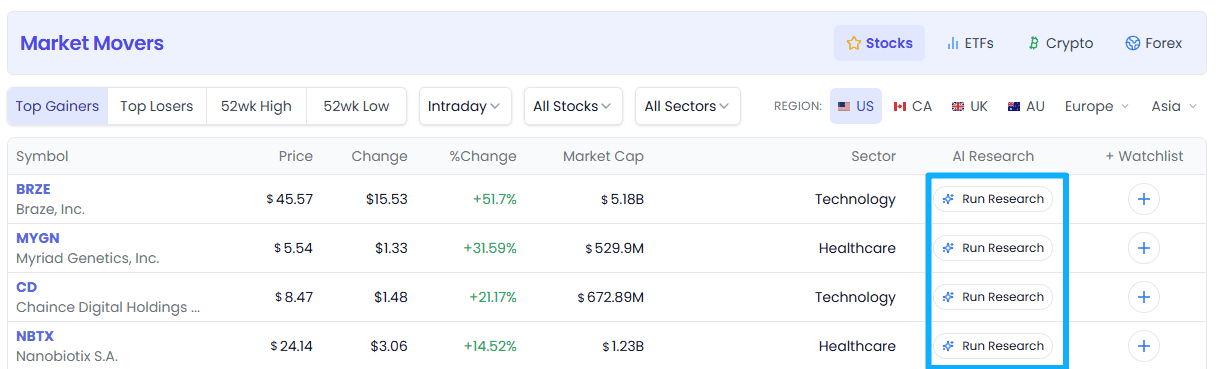
The "AI Research" button on every row — click to invoke AI tools to analyze that stock:
- Quick analysis
- Deep research
- And more (exact features depend on which AI tools you have access to)
No need to leave the Market Movers page to quickly get AI insights on moving stocks.
+ Watchlist
For stocks you're interested in, click the +Watchlist button to add them to your watchlist for easy follow-up.
💡 5 Typical Use Cases
Scenario 1: Quick Market Scan Before Open (Pre-Market Prep)
You're a day trader and want to know before the open every day: what's market sentiment today?
Steps:
- Open Market Movers → Stocks → US
- Switch to
Prev. Daytimeframe - Quick scan of Top Gainers and Top Losers
- Check 52wk High / 52wk Low to feel the market's strength/weakness
- For stocks you're interested in, click AI Research to quickly understand why
Why it's useful: build an overall feel for the market before the open, avoid scrambling once trading starts.
Scenario 2: Intraday Momentum Trading with Strong Stocks
You trade short-term and want to find today's strongest stocks likely to keep going up.
Steps:
- Stocks → US → Top Gainers
- Timeframe =
Intraday - Filter =
S&P 500(large-caps have good liquidity, good for trading) - Sort by %Change, look at the top 20
- Focus on: stocks not up the most but steadily rising with increasing volume
- For candidates, use AI Research to quickly check if there's positive news catalyst
Why it's useful: momentum plays in large-caps with liquidity assurance, easy to enter and exit.
Scenario 3: Finding Breakout Opportunities with 52-Week Highs
You're a trend trader who believes "strength begets strength" and wants stocks breaking out to the upside.
Steps:
- Stocks → US → 52wk High
- Filter =
Russell 1000(covers large and mid caps, broad enough pool) - Sort by gain/market cap, browse stocks making new highs
- Focus on:
- Fresh breakouts (not huge gains yet)
- In hot sectors
- With fundamental support (use AI Research for quick judgment)
- Add to Watchlist for ongoing tracking
Why it's useful: hitting a 52-week high is a classic technical signal — no overhead resistance, less friction upward.
Scenario 4: Crypto Movement Monitoring
You follow the crypto market and want to find 24/7 non-stop trading opportunities.
Steps:
- Switch to Crypto category
- Choose a filter based on your risk appetite:
- Conservative:
Prices Over $50(major coins) - Moderate:
Prices $1 to $50(mid-tier coins) - High risk / high reward:
Penny Cryptos (<$1)(small-cap coins)
- Conservative:
- Watch Top Gainers for hot spots, Top Losers for bottom-fishing opportunities
- For coins you're interested in, click AI Research to check project fundamentals
Why it's useful: crypto markets are volatile and trade 24/7 — manual tracking is impossible. Market Movers updates every 30 minutes, helping you spot movements first.
Scenario 5: Finding Opportunities by Sector (Top-Down Stock Picking)
You have a thesis: "AI will continue to be hot this year" and want AI-related strong stocks.
Steps:
- Stocks → US → Top Gainers
- Filter stays
All Stocks - Sector =
Technology(or whatever sector you're bullish on) - Browse the gainers list, find the best-performing stocks in that sector
- Switch to 52wk High, see which tech stocks are making new highs
- Combine everything, pick the few most worth researching
Why it's useful: pick the right sector first, then pick stocks within it — higher win rate. "When the wind blows, even pigs fly."
❓ FAQ
Q1: How often is the data updated?
Intraday data refreshes every 30 minutes. Intraday updates for stocks and ETFs start about 1 hour after U.S. market open (10:00 AM EST). Crypto updates 24/7 around the clock, starting from 00:00 UTC daily.
Q2: Why is there sometimes no Intraday data?
If the market just opened, there needs to be enough data accumulated to calculate meaningful gainers/losers. At those times the page prompts you that data will be available in about 1 hour — you can first look at "Prev. Day" (previous trading day) data.
Q3: Which countries/regions' markets are supported?
Major global markets are supported: US, Canada, UK, Australia, European countries (Germany, France, Switzerland, Sweden, etc.), Asian countries (China, Hong Kong, Japan, India, Southeast Asia, etc.). Stocks and ETFs are categorized by region; crypto and forex are global markets.
Q4: What's the difference between free users and Pro users?
| Free Users | Pro Members | |
|---|---|---|
| Results shown | First 10 only | Full list |
| "View More" button | Opens Pro upgrade page | Loads 25 more results per click |
Q5: What are 52-week highs/lows?
52-week high = a stock's price has hit its highest level in the past 52 weeks (~one year). 52-week low is the opposite.
It's a classic technical analysis indicator — a new high usually means a strong uptrend, a new low may mean a continuing downtrend. But note: technical indicators don't guarantee future performance.
Q6: What are leveraged ETFs? Why can I choose to exclude them?
Leveraged ETFs use financial derivatives and debt to amplify the returns of an underlying index (e.g. 2x, 3x long/short). They're volatile and high-risk, suitable for experienced traders. If you're a conservative investor, select "Non-leveraged ETFs" to filter out leveraged products.
🔗 Related Features
- Smart Money — validate stocks you find in Market Movers from the smart money perspective (analysts, insiders, Congress, gurus)
- Guru Portfolios — see whether gurus hold these moving stocks
- AI Stock Picker — use AI stock-picking strategies to find more precise trading opportunities
- Watchlist — add stocks you follow to your watchlist and track them anytime
Screenshots in this article: Actual product UI as of August 2026. For feedback or questions, reach out to our team anytime.
Watchlist
Smart watchlists with real-time monitoring and daily email alerts — AI scores, technical indicators, and event notifications, all in one place
AI Stock Picker
13 AI strategies across 4 factor dimensions for precise stock picking from thousands of stocks — Value, Quality, Momentum, and Multi-factor balance, with a strategy for every investment style