 Academy
Smart Signals
72 technical signals with real-time scanning and a custom screener — Trend, Momentum, Volatility, and Volume signal categories to catch every trading opportunity
What is Smart Signals? What can it do for you?
What is "Smart Signal Scanner"?
With thousands of stocks trading every day, watching them all manually is impossible. Smart Signals is a real-time technical signal scanner — you set the technical patterns you want (e.g. "Golden Cross + RSI Oversold"), and it automatically finds every matching symbol across all stocks, ETFs, crypto, and forex.
Core Features:
| Dimension | Description |
|---|---|
| 📊 72 Technical Signals | Trend (20), Momentum (24), Volatility (14), Volume (14) — four categories |
| ⏱️ 5 Timeframes | 30min · 1hour · 4hour · Daily · Weekly |
| 💹 4 Asset Classes | Stocks / ETFs / Crypto / Forex |
| 🔧 Fully Customizable | Freely combine signals, supports AND/OR match modes |
| 💾 Save Scans | Save your favorite combos as Scans, run with one click |
| ⚡ Real-Time Data | Results update instantly based on live market data |
Core Idea: Replace Subjective Judgment with Technical Signals
Many traders trade by feel and get swayed by emotions. Smart Signals adds value because:
- Clear rules: Every signal has a standard technical definition — no ambiguity
- Full market coverage: Thousands of symbols scanned simultaneously — no missed opportunities
- Multi-signal validation: Stack multiple signals to find picks that best match your strategy
- Multiple timeframes: Works for day trading and long-term investing alike
- Time-saving: Screens thousands of stocks into a candidate list in seconds
What Can You Do with Smart Signals?
- ✅ Find buy setups: Screen for bullish signals like golden cross, oversold bounces, and breakouts
- ✅ Find sell/short setups: Screen for bearish signals like death cross, overbought conditions, and breakdowns
- ✅ Custom strategies: Turn your own trading ideas into repeatable scanners
- ✅ Multi-timeframe confluence: Check daily + hourly signals together for higher win rates
- ✅ Spot sector rotation: Quickly discover which industries are showing batch technical signals
Note: Smart Signals is a technical analysis screening tool, not trading advice. Technical signals are probabilistic — use them alongside your own trading system and risk management rules.
Quick Start: 3 Steps for Beginners
Access
- URL: https://www.kavout.com/smart-signals
- Pro exclusive — requires Pro membership
- Free users see the product landing page (UnAuthHomePage)
- Log in with Pro to enter the Dashboard
Step 1: Start with a Template, Run It First
There are 4 Quick Start templates on the page — curated strategy combos:
| Template | Type | Best For |
|---|---|---|
| Reversal Hunt | Mixed | Bottom-fishing reversals, catching exhaustion after oversold conditions |
| Multi-TF Breakouts | Bullish | Daily trend confirmation + hourly volume breakout |
| Top Exhaustion | Bearish | Overbought + bearish divergence — top-exit signal |
| Crypto Multi-TF | Bullish | Crypto multi-timeframe confluence buy points |
Click any template → the scan editor pops up → click "Run" to see results instantly.
💡 Templates can be used as-is or modified before running — a great starting point for learning.
Step 2: Browse 72 Signals, Find Your Favorites
In the "Browse signals" area, 4 tabs correspond to the four signal categories:
- Trend — moving averages, crossovers, channel breakouts, etc.
- Momentum — RSI, MACD, KDJ, divergence, etc.
- Volatility — Bollinger Bands, ATR, Keltner Channels, etc.
- Volume — OBV, VWAP, volume-price divergence, etc.
Each category is split into Bullish and Bearish columns. Click ➕ next to a signal to quickly add it to a new scan.
Step 3: Create Your Own Scan
Click "New Scan" in the top right → the scan editor opens:
- Choose asset type (Stocks / ETFs / Crypto / Forex)
- Choose region (only for Stocks/ETFs)
- Add signals (max 10), select timeframe for each
- Choose match mode (OR = any / AND = all)
- Click "Run" to execute, or "Save" to store for later
Dashboard Breakdown
The first page you see when opening Smart Signals is the Dashboard. It has 6 major modules from top to bottom:
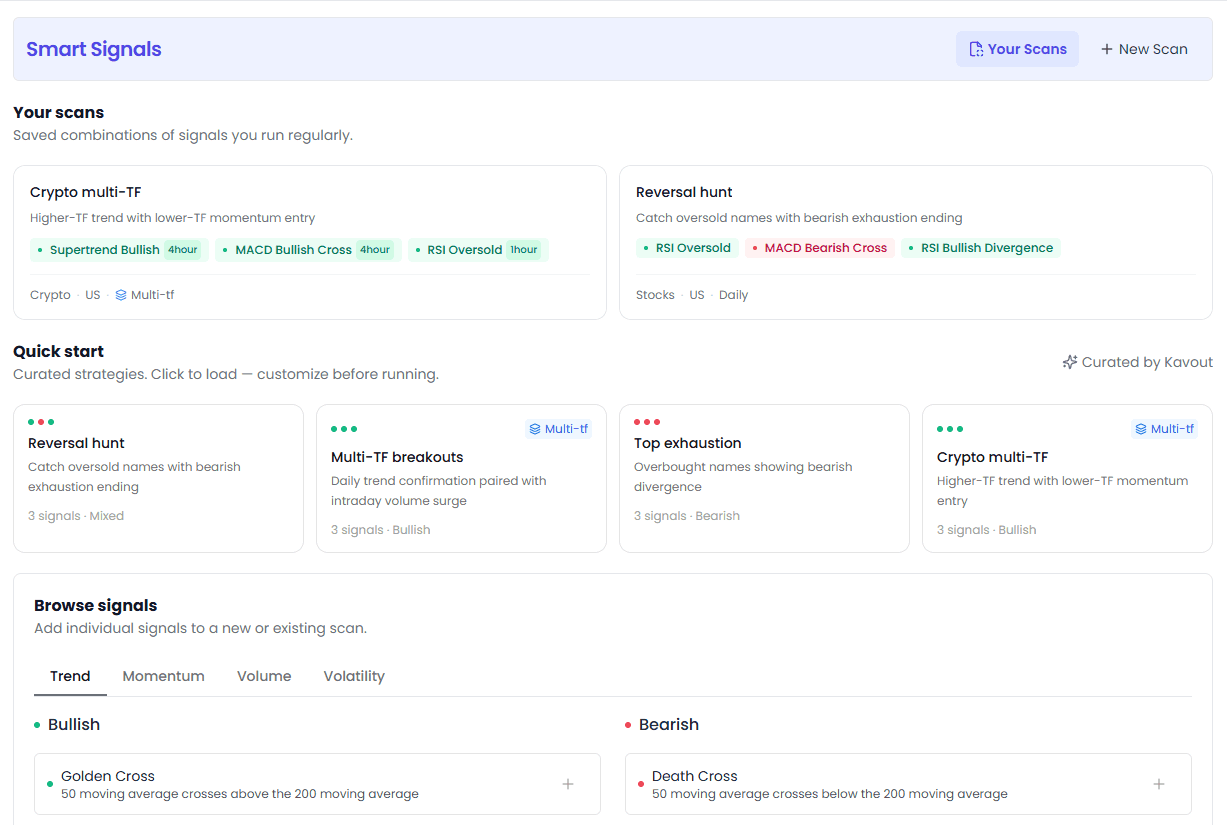
1. Top Navigation Bar
- Your Scans (current page): View and manage all saved scans
- New Scan: Create a new custom scan
- Purple background highlight for strong brand identity
2. Your Scans (Saved Scans)
Shows all your saved scans (custom + favorited predefined).
What's on each card?
- Scan name + description
- Signal tags (green = bullish, red = bearish)
- Multi-timeframe shows a "Multi-tf" badge
- Bottom info: asset type · region · timeframe
- Hover to show edit ✏️ and delete 🗑️ buttons
Actions:
- Click card → immediately runs the scan, jumps to results page
- Edit button → modify scan configuration
- Delete button → delete after second confirmation
4 scan cards per page, pagination beyond that.
3. Quick Start (Template Scans)
4 curated template cards — click any to load into the editor:
- Reversal Hunt: RSI Oversold + MACD Bearish Cross + RSI Bullish Divergence
- Multi-TF Breakouts: Daily Ichimoku Breakout + Hourly OBV Rising + ADX Bullish
- Top Exhaustion: RSI Overbought + RSI Bearish Divergence + Bollinger Band Rejection
- Crypto Multi-TF: Supertrend Buy + MACD Bullish Cross + RSI Oversold (4hour / 1hour)
Each card shows signal count, scan type (Bullish/Bearish/Mixed), and whether it's multi-timeframe.
4. Browse Signals
A categorized browser for all 72 signals. 4 top tabs: Trend / Momentum / Volume / Volatility.
Each tab uses a two-column layout:
- Left column (Bullish): Green dot markers, all buy signals
- Right column (Bearish): Red dot markers, all sell signals
Each signal shows:
- Signal name
- Signal description (info, one-line trigger condition)
- ➕ button (add to new scan)
💡 All signals are Pro exclusive.
5. Featured Signals
An in-depth look at two featured signals' results: MACD Bullish Divergence and RSI Bullish Divergence.
Features:
- Asset tabs: Switch between Stocks / ETFs / Crypto / Forex
- Timeframe filter bar: 30min · 1hour · 4hour · Daily · Weekly
- Results table: Symbol, price, market cap, detection time, AI Research
- View More / View Less: Expand/collapse more results
- Click a ticker to open the detail modal
- "Read more" link jumps to educational articles about the signal
💡 A great place to learn what individual signal patterns look like — no need to build your own scan, just see the most classic signals in action.
6. FAQ
Accordion-style FAQ covering:
- How Smart Signals works
- What a Scan is
- Difference between Saved Scans and Predefined Scans
- How to create custom scans
Scan Editor (New Scan / Edit Scan)
Clicking "New Scan" or editing an existing scan slides in an editor drawer from the right. This is Smart Signals' core interface.
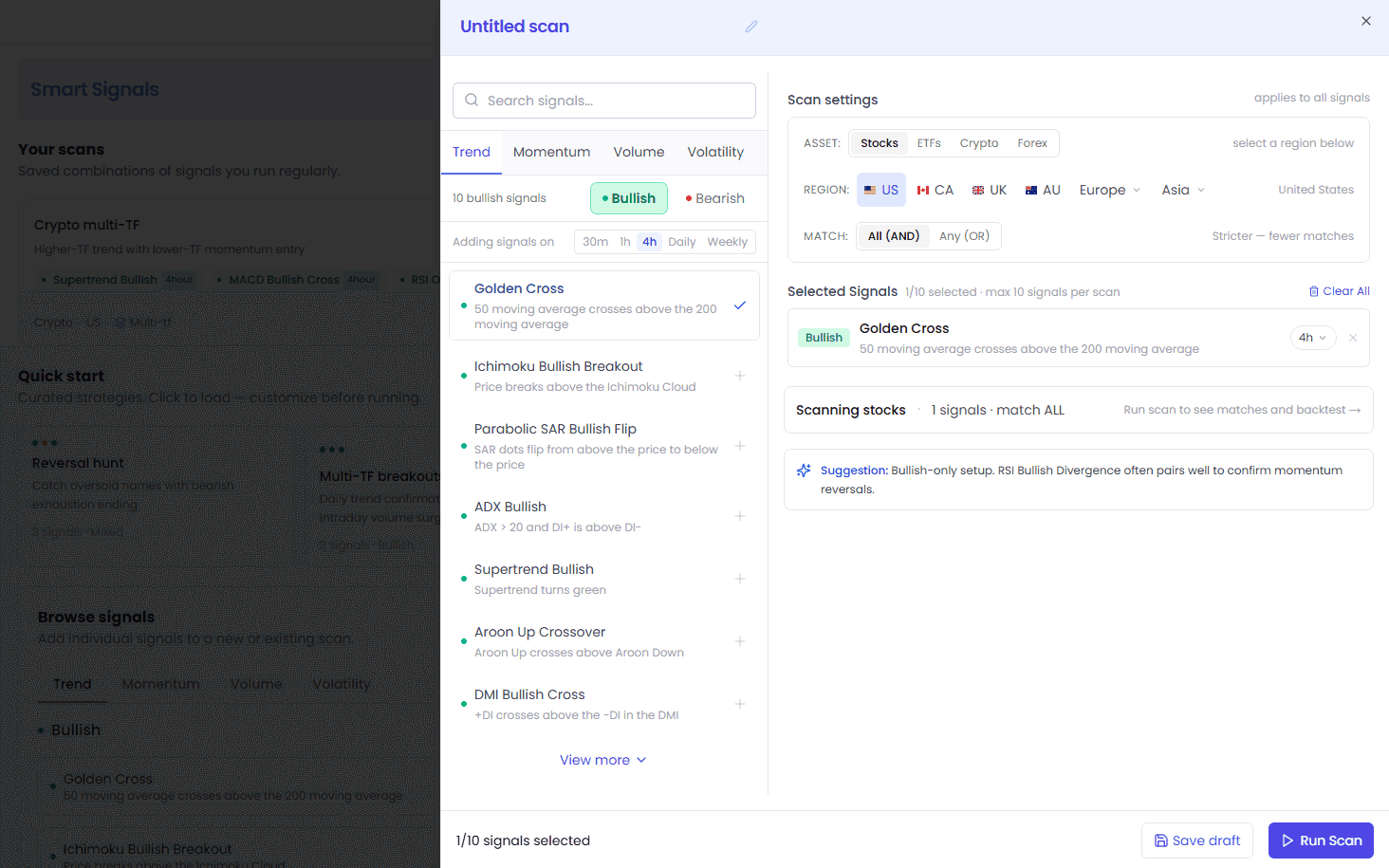
Editor Layout
The editor uses a split-pane layout (drawer-style on mobile): signal library on the left, scan settings on the right.
Left: Signal Browser
All available signals grouped by four categories:
- 🔍 Search box: Quickly search signals by name (type "rsi" to filter)
- Category tabs: Trend / Momentum / Volume / Volatility
- Direction toggle: All / Buy / Sell filters
- Timeframe selector: 30min · 1hour · 4hour · Daily · Weekly (selected signals default to this timeframe)
- Signal list: Each with colored dot (green=buy, red=sell) + name + short description
- Click a signal → adds to the selected list on the right
- Click again → removes from selected list
- View More / View Less: Expand/collapse long lists
Right: Scan Settings
① Scan Name
- Editable title bar
- Can run without filling it in (shows as "Unsaved Scan")
- Can be filled in when saving
② Asset Type
| Type | Regions Available | Timeframes Available |
|---|---|---|
| Stocks | 30+ global markets | 30min · 1hour · 4hour · Daily · Weekly |
| ETFs | Major markets | Same as above |
| Crypto | N/A | All timeframes |
| Forex | N/A | All timeframes |
⚠️ Non-US stocks/ETFs only have Daily and Weekly timeframes — no intraday (30min / 1hour / 4hour) data. If you select intraday signals, they auto-downgrade to Daily.
③ Region
- Only shown for Stocks and ETFs
- Multi-level selector, supports 30+ major global markets
- Shares the same region system as AI Stock Picker
④ Match Mode
| Mode | Description | Best For |
|---|---|---|
| ANY (OR) | Hit if any one signal matches | Expand screening range, find more opportunities |
| ALL (AND) | All signals must match simultaneously | Multi-signal confluence, stricter screening |
⑤ Selected Signal List
- Max 10 signals per scan
- Each signal shows: direction dot + name + timeframe pill (click to change timeframe)
- Can delete signals individually
- Multi-timeframe shows a "Multi-tf" badge
- Total signal count summary at the bottom
- AI smart suggestion bar: optimization tips based on your selections
⑥ Bottom Action Bar
- Left side shows selected signal count (max 10)
- Save draft: Save as a draft (to Your Scans)
- Run Scan: Execute immediately, jumps to results page
Four Signal Categories in Detail

1. Trend Signals
Trend signals help you identify trend direction, reversals, and breakouts.
All Signals
| Signal | Direction | Trigger Condition |
|---|---|---|
| Golden Cross | Bullish | 50-day MA crosses above 200-day MA |
| Death Cross | Bearish | 50-day MA crosses below 200-day MA |
| Ichimoku Bullish Breakout | Bullish | Price breaks above the Ichimoku cloud |
| Ichimoku Bearish Breakout | Bearish | Price breaks below the Ichimoku cloud |
| Parabolic SAR Bullish Flip | Bullish | SAR dots flip from above to below price |
| Parabolic SAR Bearish Flip | Bearish | SAR dots flip from below to above price |
| ADX Bullish | Bullish | ADX > 20 and DI+ above DI- |
| ADX Bearish | Bearish | ADX > 20 and DI- above DI+ |
| Supertrend Bullish | Bullish | Supertrend turns green |
| Supertrend Bearish | Bearish | Supertrend turns red |
| Aroon Up Crossover | Bullish | Aroon Up crosses above Aroon Down |
| Aroon Down Crossover | Bearish | Aroon Down crosses above Aroon Up |
| DMI Bullish Cross | Bullish | +DI crosses above -DI |
| DMI Bearish Cross | Bearish | -DI crosses above +DI |
| Donchian Channel Breakout | Bullish | Price breaks above Donchian upper band |
| Donchian Channel Breakdown | Bearish | Price breaks below Donchian lower band |
| Uptrend | Bullish | Sustained uptrend |
| New Uptrend | Bullish | Potential reversal up after a downtrend |
| Downtrend | Bearish | Sustained downtrend |
| New Downtrend | Bearish | Potential reversal down after an uptrend |
2. Momentum Signals
Momentum signals help you catch overbought/oversold conditions, divergences, and momentum shifts.
All Signals
| Signal | Direction | Trigger Condition |
|---|---|---|
| RSI Oversold | Bullish | RSI crosses above 30 |
| RSI Overbought | Bearish | RSI crosses below 70 |
| MACD Bullish Cross | Bullish | MACD line crosses above signal line |
| MACD Bearish Cross | Bearish | MACD line crosses below signal line |
| Stochastic Oversold | Bullish | Stochastic %K crosses above %D from below 20 |
| Stochastic Overbought | Bearish | Stochastic overbought condition |
| RSI Bullish Divergence | Bullish | Price makes lower lows but RSI makes higher lows (bullish divergence) |
| RSI Bearish Divergence | Bearish | Price makes higher highs but RSI makes lower highs (bearish divergence) |
| MACD Bullish Divergence | Bullish | MACD bullish divergence |
| MACD Bearish Divergence | Bearish | MACD bearish divergence |
| Stoch RSI Oversold | Bullish | Stochastic RSI crosses above 20 |
| Stoch RSI Overbought | Bearish | Stochastic RSI crosses below 80 |
| Ultimate Oscillator Buy | Bullish | Ultimate Oscillator crosses above 30 |
| Ultimate Oscillator Sell | Bearish | Ultimate Oscillator crosses below 70 |
| Williams %R Oversold | Bullish | Williams %R crosses above -80 |
| Williams %R Overbought | Bearish | Williams %R crosses below -20 |
| Awesome Oscillator Bullish Cross | Bullish | AO crosses above zero |
| Awesome Oscillator Bearish Cross | Bearish | AO crosses below zero |
| CCI Oversold | Bullish | CCI crosses above -100 |
| CCI Overbought | Bearish | CCI crosses below 100 |
| CMO Bullish Cross | Bullish | CMO turns from negative to positive |
| CMO Bearish Cross | Bearish | CMO turns from positive to negative |
| Outperforming the market (SPY) | Bullish | Outperforming S&P 500 |
| Underperforming the market (SPY) | Bearish | Underperforming S&P 500 |
3. Volatility Signals
Volatility signals help you identify volatility breakouts, Bollinger patterns, and volatility expansion.
All Signals
| Signal | Direction | Trigger Condition |
|---|---|---|
| Bollinger Band Bounce | Bullish | Price touches Bollinger lower band (bounce expected) |
| Bollinger Band Rejection | Bearish | Price touches Bollinger upper band (rejection expected) |
| Keltner Channel Breakout | Bullish | Price breaks above Keltner upper band |
| Keltner Channel Breakdown | Bearish | Price breaks below Keltner lower band |
| Volatility Breakout | Bullish | Volatility contraction followed by upside breakout |
| Volatility Breakdown | Bearish | Volatility contraction followed by downside breakdown |
| Bollinger Squeeze Buy | Bullish | Bollinger squeeze followed by upside breakout |
| Bollinger Squeeze Sell | Bearish | Bollinger squeeze followed by downside breakdown |
| ATR Expansion Buy | Bullish | ATR expanding + price rising |
| ATR Expansion Sell | Bearish | ATR expanding + price falling |
| Bollinger Midline Breakout | Bullish | Price crosses above Bollinger midline |
| Bollinger Midline Breakdown | Bearish | Price crosses below Bollinger midline |
| Bollinger Upper Breakout | Bullish | Close price above Bollinger upper band |
| Bollinger Lower Breakdown | Bearish | Close price below Bollinger lower band |
4. Volume Signals
Volume signals help you confirm trend validity and spot volume-price divergences.
All Signals
| Signal | Direction | Trigger Condition |
|---|---|---|
| A/D Line in a Uptrend | Bullish | Accumulation/Distribution line in uptrend |
| A/D Line in a Downtrend | Bearish | Accumulation/Distribution line in downtrend |
| OBV Rising | Bullish | On-Balance Volume rising with price |
| OBV Falling | Bearish | On-Balance Volume falling with price |
| CMF Positive Cross | Bullish | CMF rising and crossing above 0 |
| CMF Negative Cross | Bearish | CMF falling and crossing below 0 |
| OBV Bullish Divergence | Bullish | OBV bullish divergence (price lower low, OBV higher low) |
| OBV Bearish Divergence | Bearish | OBV bearish divergence (price higher high, OBV lower high) |
| Volume Spike in a Uptrend | Bullish | Volume spike during an uptrend |
| Volume Spike in a Downtrend | Bearish | Volume spike during a downtrend |
| Price Above VWAP | Bullish | Price above VWAP |
| Price Below VWAP | Bearish | Price below VWAP |
| VWAP Rising | Bullish | VWAP rising + price above it |
| VWAP Falling | Bearish | VWAP falling + price below it |
Scan Results Page Breakdown
After running a scan, you land on the results page showing all matching symbols.
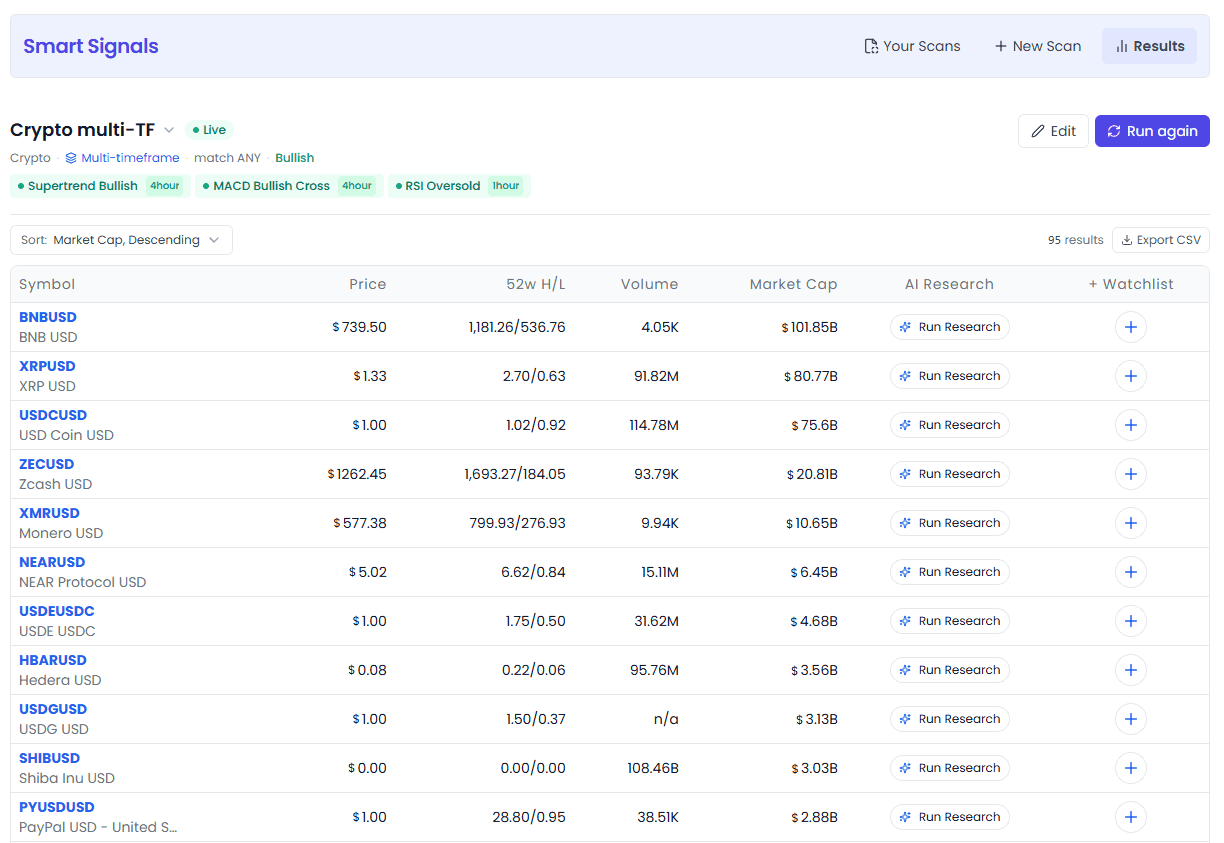
Top Info Bar
Scan info area:
- Scan name (click to expand a scan switcher dropdown, quickly switch to other saved scans)
- Status badge: Live / Unsaved
- Meta info row: asset type · region · timeframe (Multi-tf badge for multi-timeframe) · match mode · scan type
- Signal pills: first 3 signals + "+N more" (collapses when there are many)
Action buttons:
- 💾 Save: Save an unsaved scan (dialog pops up — fill name + description)
- ✏️ Edit: Open the editor to modify configuration
- 🔄 Run again: Re-run the scan (refresh data)
- ⬅️ Back to all scans: Return to Dashboard
Toolbar
| Control | Options | Description |
|---|---|---|
| Sort By | Market cap asc/desc, symbol A-Z/Z-A, price asc/desc | Auto re-scans after changing sort |
| Result count | — | Shows total matches |
| Export CSV | — | Export current results as CSV |
Results Table
| Column | Description |
|---|---|
| Symbol | Ticker + name, click to open Asset Modal detail popup |
| Price | Current price |
| 52W H/L | 52-week high/low range |
| Volume | Trading volume |
| Market Cap | Market capitalization |
| 🤖 AI Research | AI research tools (Mini Analysis Buttons) |
| ⭐ Watchlist | One-click add to watchlist |
📱 Mobile: Fewer columns, with a switchable "Performance" column (choose one of Price / 52W H/L / Volume / Market Cap).
Status States
The results page shows 3 states:
- Loading: Skeleton screen
- No results: No matching symbols found — try relaxing conditions
- Results: Matching symbol list (paginated, 15 per page)
Clicking a Symbol
Clicking a Symbol in the table opens the Asset Modal detail popup where you can view:
- Price chart
- Technical analysis
- AI stock analysis
- and more
General Usage Notes
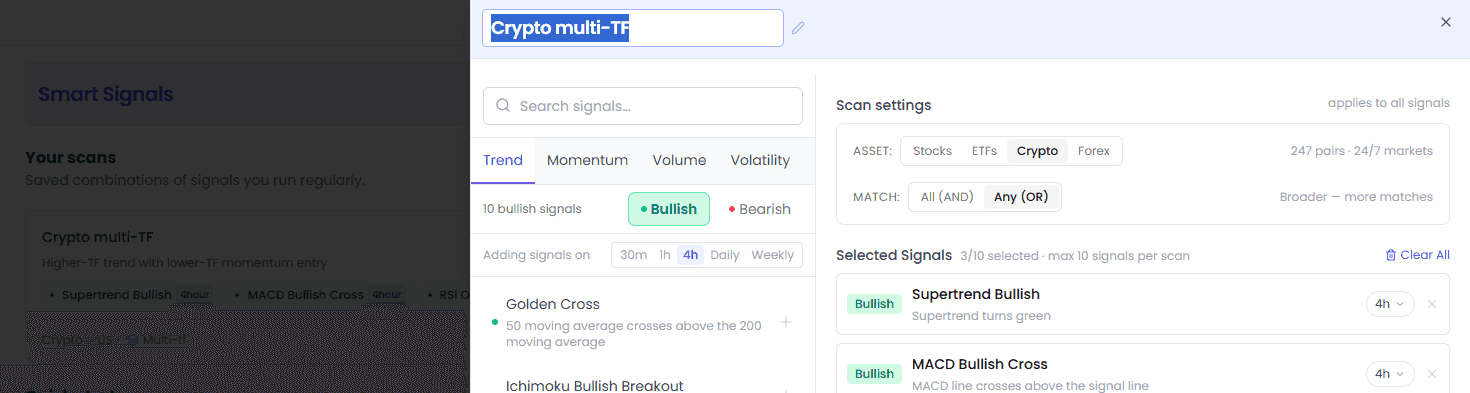
Save / Edit / Delete Scans
| Action | Where | Notes |
|---|---|---|
| Save a scan | Click Save in the editor / Save on results page | Needs a name, saved to Your Scans |
| Edit a scan | Hover Your Scans card → click ✏️ / click Edit on results page | Can save or run directly after modifying |
| Delete a scan | Hover Your Scans card → click 🗑️ | Second confirmation required, cannot be undone |
Scan Type
The system auto-determines the type based on your selected signals:
- Bullish: All signals are buy type
- Bearish: All signals are sell type
- Mixed: Both buy and sell signals present
Pro Exclusive
Smart Signals is a Pro-exclusive feature. Pro membership gives you:
- All 72 technical signals (Trend / Momentum / Volatility / Volume)
- All 5 timeframes (30min · 1hour · 4hour · Daily · Weekly)
- 4 asset classes (Stocks / ETFs / Crypto / Forex)
- Custom scans, unlimited saves
- Full results list + CSV export
- 30+ global stock markets
Free users visiting the page see a product landing page highlighting features and pricing — upgrade to Pro to unlock everything.
Dark Mode
- Auto-switches light/dark themes following system settings
FAQ
How often is data updated?
Update frequency varies by asset and timeframe:
- Intraday signals (30min / 1hour / 4hour): Real-time calculation, updates instantly as prices change
- Daily/Weekly signals: Recalculated after each period's close
- Crypto/Forex: 24/7 real-time updates
What is a "Scan"?
A Scan is a configuration of signal combinations + filter conditions. Think of it as a "stock screener template" — save it once, and just click to run it later without re-selecting signals every time.
What's the difference between predefined signals and saved scans?
- Predefined Signals: 72 built-in single signals, categorized by type — can only be run directly on the Daily timeframe
- Saved Scans: Scan combos you create or favorite — support multi-signal, multi-timeframe, custom assets
- You can favorite predefined signals into Saved Scans, or build fully custom combos from scratch
AND vs OR mode — which should I use?
- OR mode (default): Hit if any single signal matches. Good for broadening your screening range and finding more opportunities.
- AND mode: All signals must match simultaneously. Good for multi-signal confluence screening — fewer results but higher confidence.
💡 Rule of thumb: if you pick 2-3 signals, use AND mode (confluence); if you pick 5+ signals, OR mode (breadth) works better.
Why don't non-US regions have intraday timeframes?
Intraday data (30min / 1hour / 4hour) currently only covers US market stocks and ETFs. Other regions only have Daily and Weekly signals. If you select intraday signals for a non-US region, the system auto-downgrades them to Daily.
Which signals are supported for crypto and forex?
All 72 signals work for crypto and forex. No region restrictions, all timeframes (30min · 1hour · 4hour · Daily · Weekly) available.
What's the maximum number of signals per scan?
Each scan supports up to 10 signals. Too many signals is not only slower but also prone to overfitting — usually 2-5 signal combos work best.
Which signals should I start with?
If you're new, try these in order:
| Your Style | Recommended Starting Signals |
|---|---|
| Trend following | Golden Cross + ADX Bullish + Supertrend |
| Bottom-fishing / reversal | RSI Oversold + MACD Bullish Divergence + Bollinger Band Bounce |
| Breakout trading | Donchian Channel Breakout + Volatility Breakout + Volume Spike |
| Top-exit / shorting | RSI Overbought + MACD Bearish Cross + Death Cross |
| Volume confirmation | OBV Rising + A/D Line Uptrend + VWAP Rising |
Run templates a few times first to get a feel for what each signal outputs, then gradually build your own strategy combos.
Appendix: Signal Quick Reference
All 72 signals organized by category and direction.
Trend — 20
| Bullish | Bearish |
|---|---|
| Golden Cross | Death Cross |
| Ichimoku Bullish Breakout | Ichimoku Bearish Breakout |
| Parabolic SAR Bullish Flip | Parabolic SAR Bearish Flip |
| ADX Bullish | ADX Bearish |
| Supertrend Bullish | Supertrend Bearish |
| Aroon Up Crossover | Aroon Down Crossover |
| DMI Bullish Cross | DMI Bearish Cross |
| Donchian Channel Breakout | Donchian Channel Breakdown |
| Uptrend | Downtrend |
| New Uptrend | New Downtrend |
Momentum — 24
| Bullish | Bearish |
|---|---|
| RSI Oversold | RSI Overbought |
| MACD Bullish Cross | MACD Bearish Cross |
| Stochastic Oversold | Stochastic Overbought |
| RSI Bullish Divergence | RSI Bearish Divergence |
| MACD Bullish Divergence | MACD Bearish Divergence |
| Stoch RSI Oversold | Stoch RSI Overbought |
| Ultimate Oscillator Buy | Ultimate Oscillator Sell |
| Williams %R Oversold | Williams %R Overbought |
| AO Bullish Cross | AO Bearish Cross |
| CCI Oversold | CCI Overbought |
| CMO Bullish Cross | CMO Bearish Cross |
| Outperforming SPY | Underperforming SPY |
Volatility — 14
| Bullish | Bearish |
|---|---|
| Bollinger Band Bounce | Bollinger Band Rejection |
| Keltner Channel Breakout | Keltner Channel Breakdown |
| Volatility Breakout | Volatility Breakdown |
| Bollinger Squeeze Buy | Bollinger Squeeze Sell |
| ATR Expansion Buy | ATR Expansion Sell |
| Bollinger Midline Breakout | Bollinger Midline Breakdown |
| Bollinger Upper Breakout | Bollinger Lower Breakdown |
Volume — 14
| Bullish | Bearish |
|---|---|
| A/D Line Uptrend | A/D Line Downtrend |
| OBV Rising | OBV Falling |
| CMF Positive Cross | CMF Negative Cross |
| OBV Bullish Divergence | OBV Bearish Divergence |
| Volume Spike (Uptrend) | Volume Spike (Downtrend) |
| Price Above VWAP | Price Below VWAP |
| VWAP Rising | VWAP Falling |
Timeframes: 30min · 1hour · 4hour · Daily · Weekly (US stocks/ETFs support all timeframes; non-US only Daily/Weekly; Crypto/Forex all timeframes)
Asset classes: Stocks · ETFs · Crypto · Forex
Match modes: OR (any match) · AND (all match)
Screenshots in this article: Actual product UI as of August 2026. For feedback or questions, reach out to our team anytime.
AI Stock Picker
13 AI strategies across 4 factor dimensions for precise stock picking from thousands of stocks — Value, Quality, Momentum, and Multi-factor balance, with a strategy for every investment style
Smart Money
Track smart money movements and discover high-conviction investment opportunities — Analysts, Insiders, Congress, and Billionaires, four data sources for cross-validation