 Academy
How to Use AI Research Agents
Professional AI research assistants — generate investment analysis in one click. Technicals, fundamentals, news sentiment, trading signals — 8 intelligent agents cover the entire market
Stop Fighting the Market Alone
Are you overwhelmed by charts, news, and endless streams of market data—only to make emotional decisions or miss out on the best trades? You're not alone. Most investors struggle with information overload, and the constant feeling of being a step behind Wall Street. But that's about to change.
Kavout's Deep Research Agents bring you an institutional-grade AI team, always ready to work for you. Here's how to use them to make smarter, faster, and more confident investment decisions.
Why We Built AI Research Agents
Investors like you face daily challenges:
- Drowning in Data: It's nearly impossible to connect the dots fast enough with mountains of signals, filings, and news.
- Emotional Trading: FOMO, panic selling, and "gut feeling" trades drive over 80% of retail losses.
- Always Late: By the time you react, the best opportunities are already gone—while institutions and algorithms never sleep.
- Lack of Resources: Hedge funds have AI and teams of analysts; retail investors are left on their own.
Kavout's AI Research Agents level the playing field, providing 24/7 objective intelligence—no matter your background or experience.
What Are AI Research Agents? What Can They Do for You?
AI Research Agents are a set of specialized AI research assistants built into Kavout. Each agent focuses on one specific dimension of investment analysis. Just enter a ticker, click run, and AI generates a professional analysis report in seconds.
Unlike generic chatbots, each agent has a clear analysis objective and professional framework, delivering structured output you can directly use for investment decision-making.
Meet Your 9 AI Agents
Agents are organized into 4 categories based on what you want to do:
I want to trade
| Agent | One-Liner | Supported Assets |
|---|---|---|
| 📈 Swing Trade Analysis | Days to weeks opportunities | Stocks / ETFs / Crypto / Forex |
| 🔔 Trading Signals QuickView | Quick multi-timeframe signals | Stocks / ETFs / Crypto / Forex |
| 📊 Technical Analyst | Live price trends & technicals | Stocks / ETFs / Crypto / Forex |
I want to invest
| Agent | One-Liner | Supported Assets |
|---|---|---|
| 💎 Buy or Sell | Investment ratings & analysis | Stocks / ETFs / Crypto / Forex |
| 💵 Fundamental Analyst | Valuations & financial health | Stocks |
I want to read the market
| Agent | One-Liner | Supported Assets |
|---|---|---|
| 🌐 Market Outlook | Global market momentum | US / Europe / China / +3 more |
| 📰 News Sentiment | Bullish or bearish news signals | Stocks / ETFs / Crypto / Forex |
I want to trade commodities
| Agent | One-Liner | Supported Assets |
|---|---|---|
| 📈 Swing Trade Analysis | Entry & exit timing | Commodities / Futures |
| 📊 Trend Analysis | Gold, oil, corn trend direction | Commodities / Futures |
What Can You Use Them For?
- ✅ Quick research reports: Enter a ticker, get multi-dimensional analysis in under 10 seconds
- ✅ Bull/bear reference: Buy or Sell gives you direct ratings and confidence levels
- ✅ Technical sweep: 100+ indicators, patterns, support/resistance — all in one click
- ✅ Sentiment awareness: Are news and social media bullish or bearish?
- ✅ Fundamental due diligence: Quick assessment of financial health and valuation
- ✅ Find trading signals: Multi-timeframe signal snapshot to catch entry timing
- ✅ Global perspective: One-click view of 6 major markets' momentum
- ✅ Commodity strategy: Dedicated analysis for gold, oil, corn, and more
⚠️ Disclaimer: AI analysis is for research reference only and does not constitute investment advice. Please make decisions based on your own judgment.
Quick Start: 3 Steps to Run an AI Analysis
Where to Find Them?
AI Research Agents appear in multiple locations — different entry points, same functionality:
| Entry Point | Display Format | Description |
|---|---|---|
| Home page | Agent cards below the main search bar | 9 agents displayed right below the search box, one-click access from home |
| Research page | "What do you want to do?" module | Full display of all 9 agents in 4 categories, great for browsing and discovery |
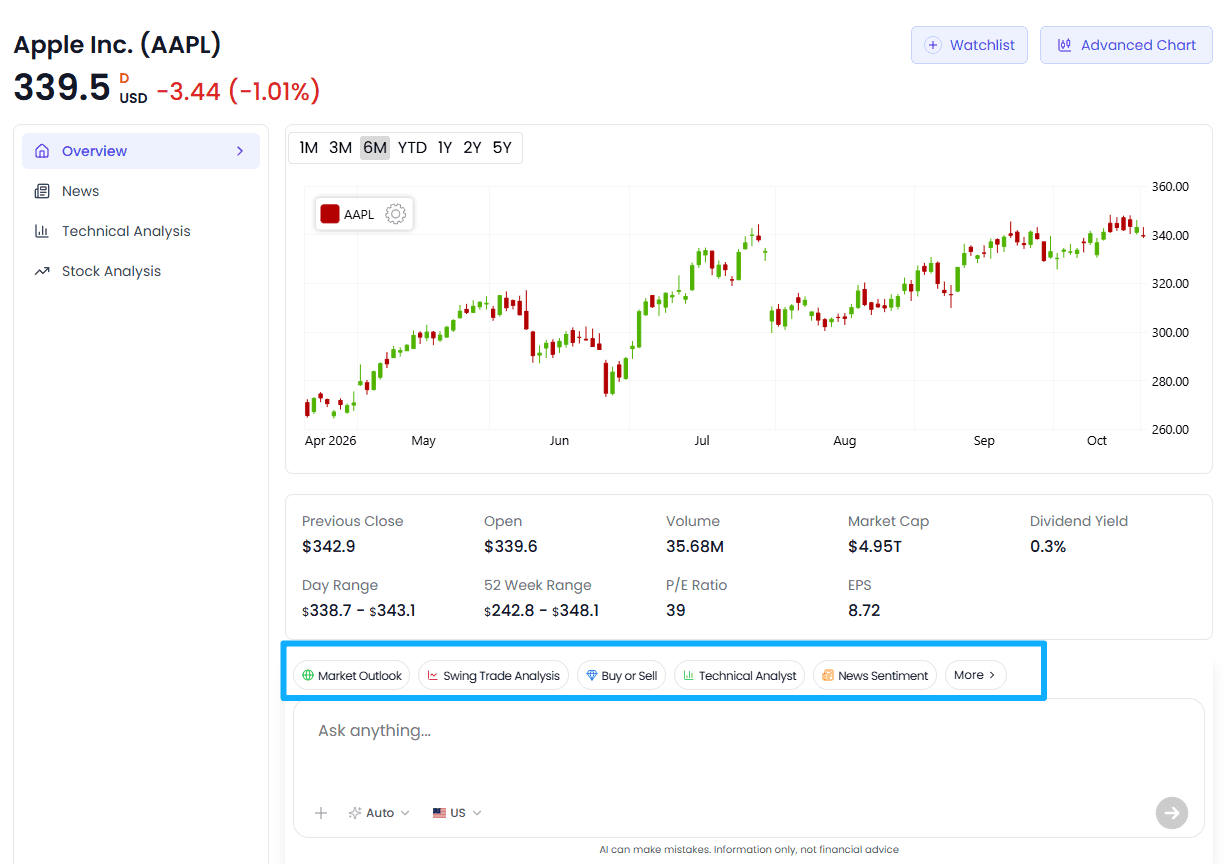
| Stock detail page | Toolbar buttons (5 on desktop / 2 on mobile) | Analyze the current stock directly |
| InvestGPT page | Toolbar buttons | Quickly launch specialized analysis during a conversation |
| Search suggestions | AI Research button on Go-to entries | Analyze a symbol directly from search |
Below we'll use the Research page to walk through the complete flow.
Step 1: Choose an Agent
Open the /research page — at the top you'll see the "What do you want to do?" module, which organizes all 9 AI agents into 4 categories:
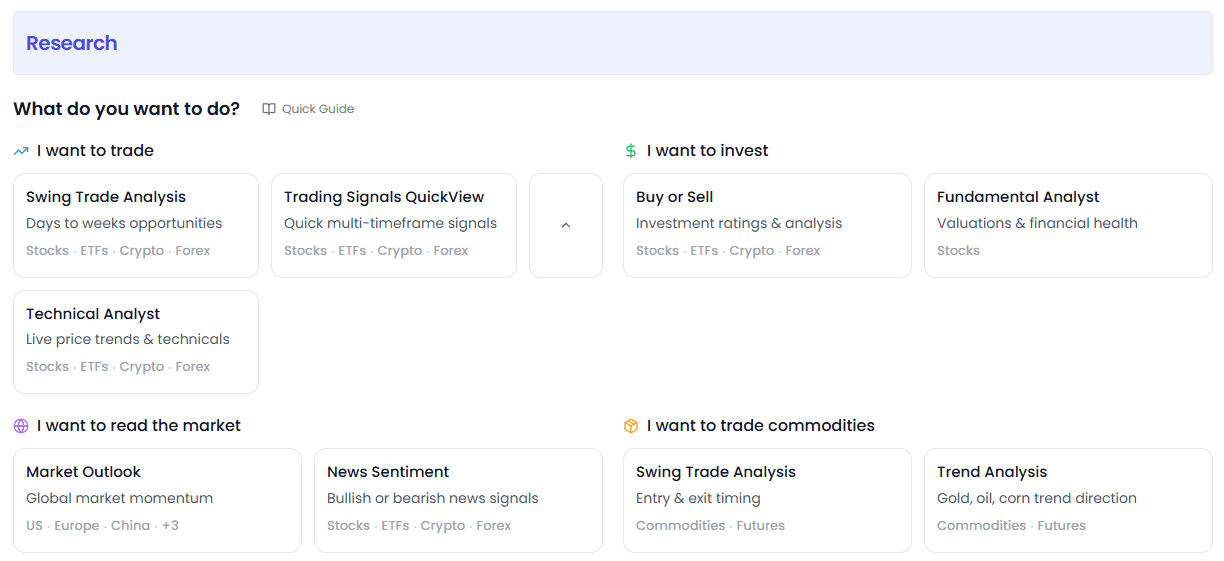
| Category | Agents |
|---|---|
| I want to trade | Swing Trade Analysis, Trading Signals QuickView, Technical Analyst |
| I want to invest | Buy or Sell, Fundamental Analyst |
| I want to read the market | Market Outlook, News Sentiment |
| I want to trade commodities | Swing Trade Analysis, Trend Analysis |
Click any agent card to start your analysis.
Beginners should start with these two:
- Buy or Sell — the most intuitive, gives direct buy/sell recommendations, great for quick decisions
- Technical Analyst — the richest information, a full technical checkup
Step 2: Enter a Symbol and Set Parameters
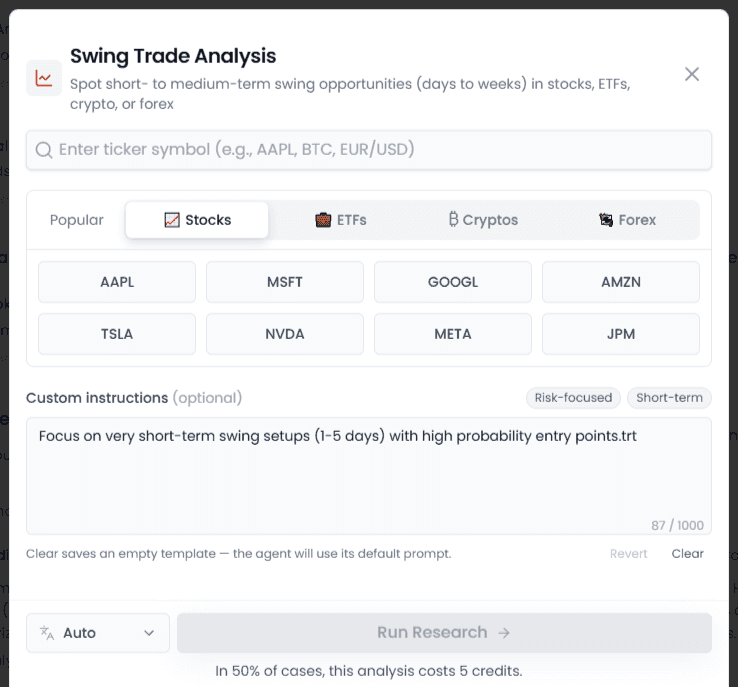
After clicking an agent, the analysis dialog appears:
- Select asset type: Switch between Stocks / ETFs / Crypto / Forex via top tabs
Note: Fundamental Analysis only supports stocks, so there's no type switcher
- Enter a symbol: Type a ticker or company name in the search box, then select from dropdown results
- Or click a popular symbol: 8 hot tickers below the search box — click to select instantly
- Choose output language: Language selector at bottom-left, supports Chinese, English, and more
- Optional: Custom Instructions — tell the AI your preferences
Step 3: Click Run Research and View Results
Click the Run Research button in the bottom right:
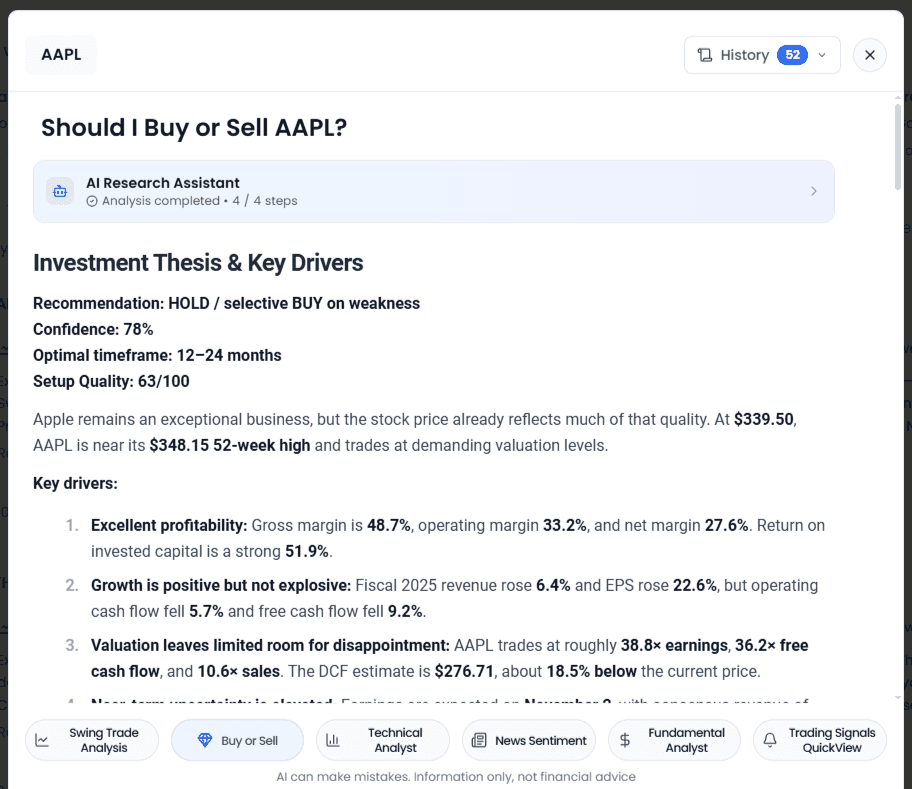
- The dialog closes and an analysis panel (Drawer) slides in from the right
- AI begins generating analysis, displayed in streaming output segment by segment
- Usually completes in 10-30 seconds; complex analysis may take longer
- After completion, you can continue asking questions in the Drawer or switch to other analyses
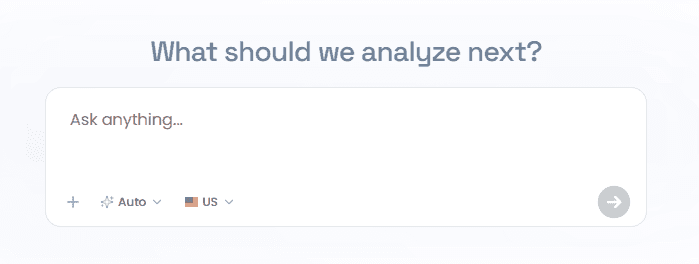
💡 Tip: If you're not sure what to pick, just ask in natural language in InvestGPT — the AI will automatically call the most appropriate agent.
The 9 Agents in Detail
1. Swing Trade Analysis
In one line: Find medium-short term swing opportunities with a holding period of days to weeks
Core capabilities:
- Identifies current trend direction and strength
- Finds potential entry and exit points
- Provides stop-loss and target price recommendations
- Assesses risk-reward ratio
Best for:
- Wanting to know if a stock has swing opportunities right now
- Holding a position and wanting to confirm if it's time to sell
- Preferring 1-4 week medium-short term trading
Presets:
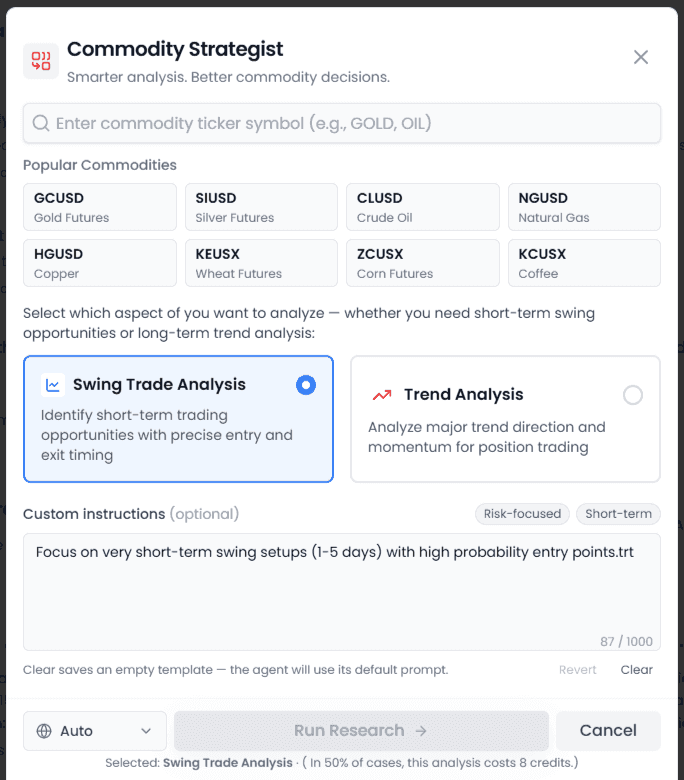
| Preset | Effect |
|---|---|
| Risk-focused | Emphasizes risk management, provides clear stop-loss and position sizing |
| Short-term | Focuses on very short-term (1-5 days), looking for high-probability entries |
Supported assets: Stocks, ETFs, cryptocurrencies, forex, commodities
2. Buy or Sell
In one line: Direct buy/sell/hold recommendations with confidence scores
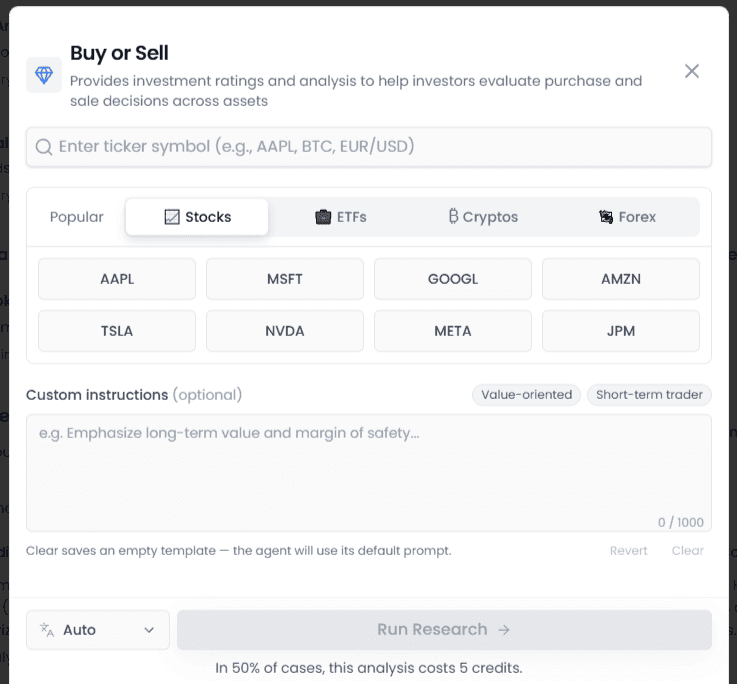
Core capabilities:
- Provides investment ratings across multiple dimensions
- Offers a Confidence Score
- Lists key reasons supporting the rating
- Highlights major risk points
Best for:
- Quickly judging whether to buy/sell a stock
- Cross-checking against your own analysis, finding blind spots
- First-pass filter when screening a batch of symbols
Presets:
| Preset | Effect |
|---|---|
| Value-oriented | Emphasizes fundamental value and margin of safety |
| Short-term trader | Short-term trading perspective, focuses on momentum and near-term catalysts |
Supported assets: Stocks, ETFs, cryptocurrencies, forex
3. Technical Analyst
In one line: 100+ technical indicators interpreted in one click — candlestick patterns, trends, support and resistance, all covered
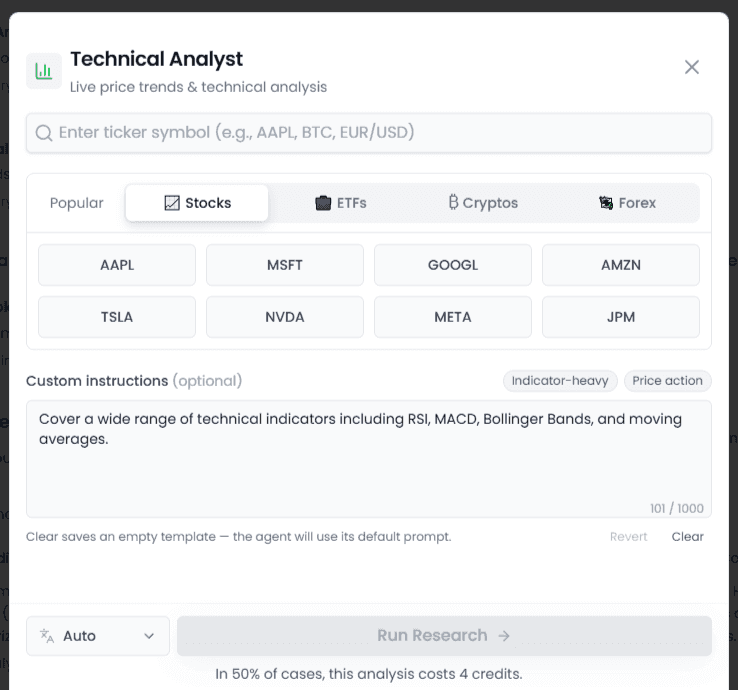
Core capabilities:
- 100+ indicator analysis including moving averages, RSI, MACD, Bollinger Bands
- Identifies chart patterns (head & shoulders tops/bottoms, double tops/bottoms, etc.)
- Marks key support and resistance levels
- Determines current trend direction and strength
Best for:
- Quickly understanding the full technical picture of a stock
- Can't read candlestick charts? Let the AI do it for you
- Confirming technical alignment before entering a position
Presets:
| Preset | Effect |
|---|---|
| Indicator-heavy | Covers RSI, MACD, Bollinger Bands, moving averages, and many more |
| Price action | Pure price action analysis, focuses on patterns and key levels |
Supported assets: Stocks, ETFs, cryptocurrencies, forex
4. News Sentiment
In one line: Are news and social media bullish or bearish? Quickly sense market sentiment
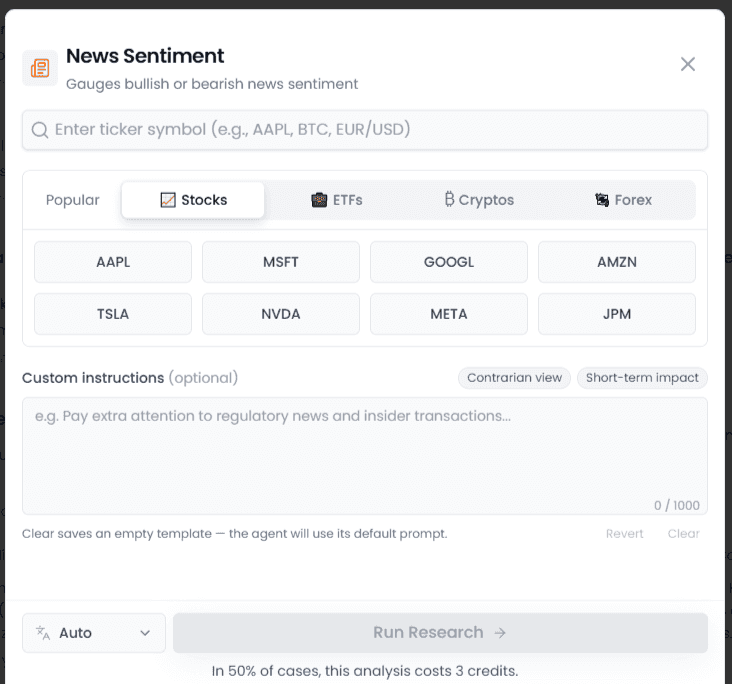
Core capabilities:
- Aggregates recent relevant news and social media discussions
- Provides an overall sentiment score (Bullish / Neutral / Bearish)
- Extracts key bullish and bearish news
- Identifies trending topics and events
Best for:
- Wanting to know the latest market opinion on a stock
- Tracking sentiment around events like earnings, M&A, regulatory news
- Contrarian indicator: extreme sentiment can signal a reversal
Presets:
| Preset | Effect |
|---|---|
| Contrarian view | Covers both bull and bear sides, provides a balanced assessment |
| Short-term impact | Focuses on near-term catalysts and expected reaction over the next few days |
Supported assets: Stocks, ETFs, cryptocurrencies, forex
5. Fundamental Analyst
In one line: Deep checkup on financial health and valuation levels
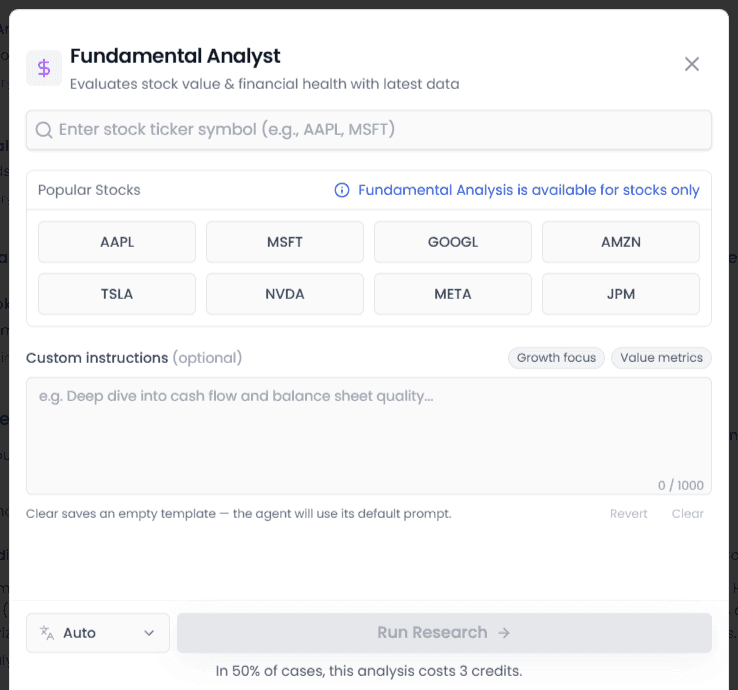
Core capabilities:
- Interpretation of key financial metrics: revenue, profit, cash flow, and more
- Assessment of profitability, solvency, and operational efficiency
- Valuation metrics like PE/PB/PS compared with peers
- Provides a composite fundamental score
Best for:
- Quickly understanding whether a company's fundamentals are solid
- First-pass filter for value investing stock selection
- Avoiding companies with financial red flags
Note: Fundamental Analysis only supports stocks. ETFs, cryptocurrencies, and forex are not supported.
Presets:
| Preset | Effect |
|---|---|
| Growth focus | Emphasizes growth metrics, revenue trajectory, and TAM expansion potential |
| Value metrics | Focuses on valuation multiples, peer comparison, and intrinsic value estimation |
Supported assets: Stocks only
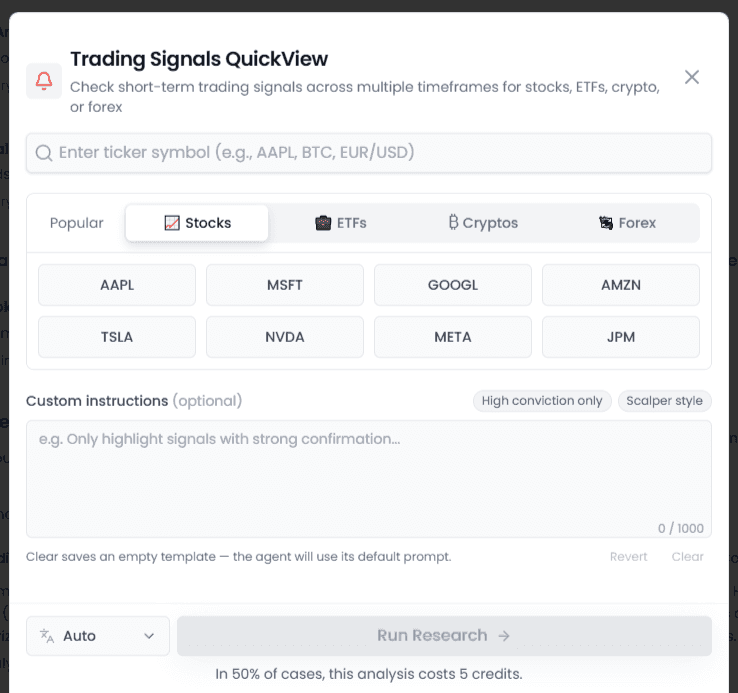
6. Trading Signals QuickView
In one line: Multi-timeframe trading signals at a glance, quickly catch entry opportunities
Core capabilities:
- Multi-timeframe (short-term / medium-term / long-term) signal scanning
- Aggregates bull/bear direction of various technical signals
- Marks high-confidence signals
- Provides the current overall bias
Best for:
- Quickly scanning multi-timeframe signals before trading
- Finding symbols with clear directional bias
- Confirming whether entry timing is right
Presets:
| Preset | Effect |
|---|---|
| High conviction only | Only marks signals confirmed by strong multi-factor alignment — quality over quantity |
| Scalper style | Very short-term signals, active fast-in-fast-out trading style |
Supported assets: Stocks, ETFs, cryptocurrencies, forex
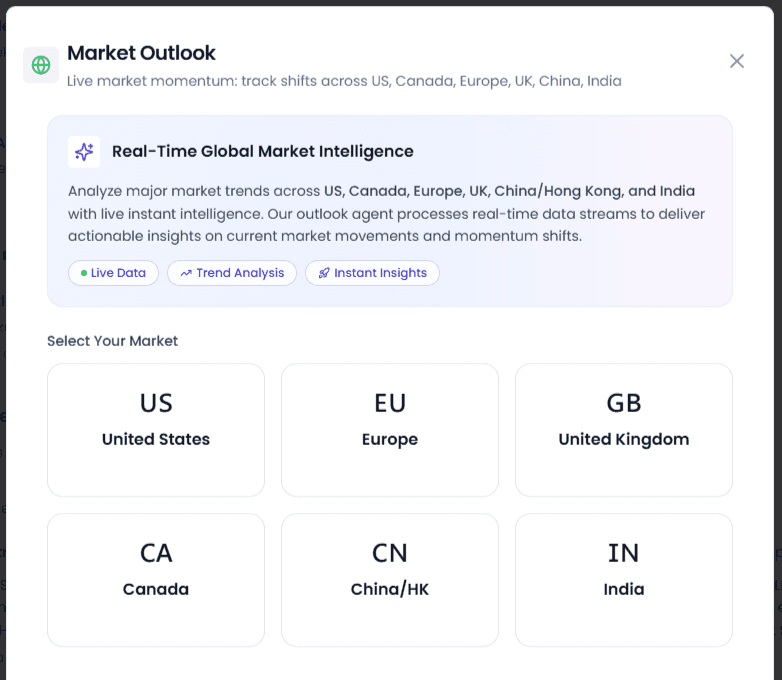
7. Market Outlook
In one line: 6 major markets' momentum at a glance, grasp the global macro direction
Core capabilities:
- Covers 6 markets: US, Europe, UK, Canada, China/HK, India
- Analyzes representative indices for each market
- Assesses current momentum and trend across markets
- Cross-market comparison to identify strong/weak regions
Best for:
- Knowing which global markets are strong and which are weak right now
- Direction reference for global asset allocation
- Macro investors catching big trends
Market selection:
| Market | Representative Indices (selectable) |
|---|---|
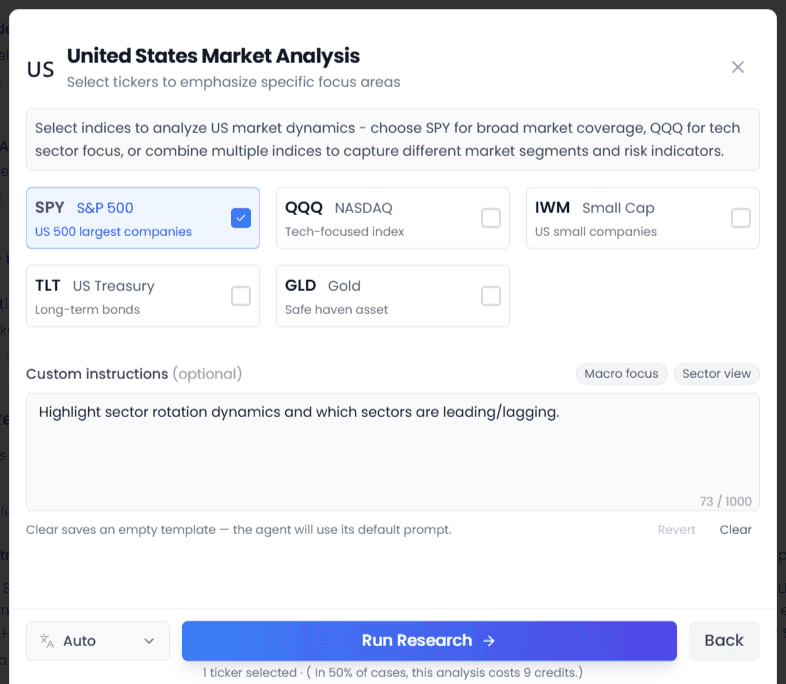
| 🇺🇸 US | SPY (S&P 500), QQQ (Nasdaq), IWM (Small Cap), TLT (Treasuries), GLD (Gold) |
| 🇪🇺 Europe | VGK (All Europe), FEZ (Euro Stoxx 50), FXE (Euro) |
| 🇬🇧 UK | EWU (UK Stocks), FXB (Pound), EWUS (UK Small Cap) |
| 🇨🇦 Canada | EWC (Canadian Stocks), FXC (Canadian Dollar), XEG.TO (Energy) |
| 🇨🇳 China/HK | MCHI (China Large Cap), FXI (H-Shares), KWEB (Internet), ASHR (A-Shares) |
| 🇮🇳 India | INDA (India Large Cap), SMIN (India Small Cap) |
Presets:
| Preset | Effect |
|---|---|
| Macro focus | Emphasizes macro data, central bank policy, and interest rate outlook |
| Sector view | Highlights sector rotation and leading/lagging sectors |
Supported assets: Global market indices (ETF form)
8. Commodity Swing Trade Analysis
In one line: Entry and exit timing for commodity and futures trading
Core capabilities:
- Identifies swing trading opportunities in commodities
- Pinpoints potential entry and exit points
- Provides stop-loss and target price levels
- Assesses risk-reward ratio for commodity trades
Best for:
- Active commodity traders looking for timing signals
- Trading gold, oil, corn, and other futures
- Wanting clear entry and exit plans for commodity positions
Supported assets: Commodities, Futures
9. Trend Analysis
In one line: Trend direction for gold, oil, corn, and other commodities
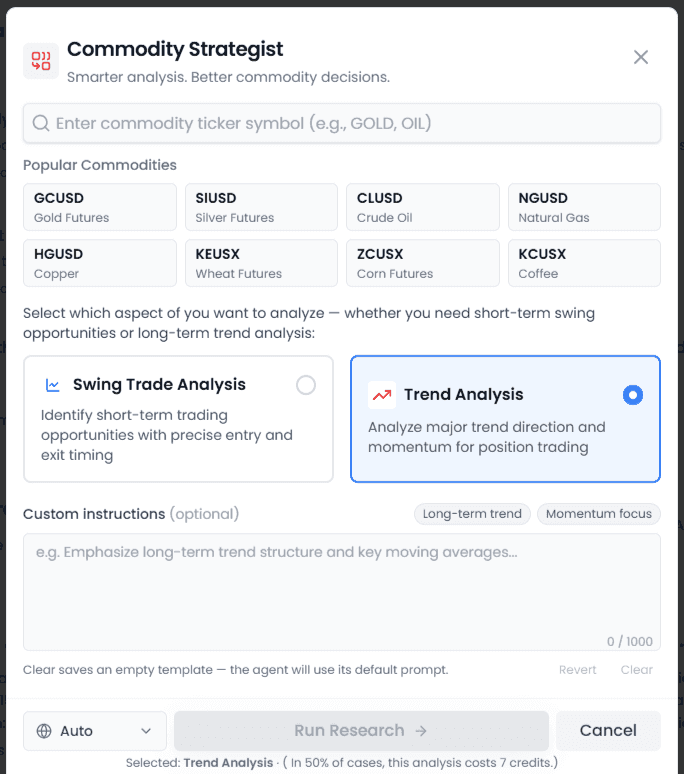
Core capabilities:
- Determines the primary trend direction (uptrend / downtrend / sideways)
- Analyzes trend strength and sustainability
- Identifies key support and resistance levels
- Covers major commodities: gold, silver, oil, natural gas, copper, wheat, corn, coffee
Best for:
- Investors wanting to know the big picture trend for commodities
- Position traders following longer-term commodity moves
- Inflation trades and safe-haven trade planning
Presets:
| Preset | Effect |
|---|---|
| Long-term trend | Focuses on long-term trend structure and key levels |
| Momentum focus | Emphasizes momentum indicators and trend strength |
Supported assets: Commodities, Futures
Custom Instructions
Every agent supports custom instructions, letting the AI tailor analysis to your preferences and style.
How to Use It
- Find the Custom Instructions area in the analysis dialog
- Click preset buttons for one-click common instructions, or manually enter your own requirements
- You can save as a template for automatic use next time
- When you click Run Research, your custom instructions are passed to the AI along with your request
Preset Instructions
Each agent has 2 official presets — click to fill:
| Agent | Preset 1 | Preset 2 |
|---|---|---|
| Swing Trade | Risk-focused | Short-term |
| Buy or Sell | Value-oriented | Short-term trader |
| Technical | Indicator-heavy | Price action |
| Fundamental | Growth focus | Value metrics |
| News Sentiment | Contrarian view | Short-term impact |
| Trading Signals | High conviction only | Scalper style |
| Market Outlook | Macro focus | Sector view |
| Trend Analysis | Long-term trend | Momentum focus |
| Support & Resistance | Key levels only | Trading plan format |
Custom Input
Besides presets, you can freely type instructions like:
- "Focus on volume and money flow"
- "Answer in Chinese, keep it concise"
- "Analyze in the context of Fed policy"
- "Give me 3 entry points with corresponding stop-loss levels"
💡 Good custom instructions make analysis results much more relevant to your needs. Try different phrasings to find what works best for you.
Multiple Entry Points
1. Research Page (Full Features)
URL: /research
A card-based layout showing all agents in full:
- 2 large cards at the top: Swing Trade Analysis and Buy or Sell (core features)
- 4-column grid below: Technical Analyst, News Sentiment, Fundamental Analyst, Trading Signals QuickView, and more
- Each card shows icon, name, feature description, and supported asset types
- Hover effect with lift and glow animation
2. Stock Detail Page (Quick Access)
On any stock/ETF detail page's search suggestions or toolbar, you'll find AI Research buttons:
- Desktop shows 5 commonly used agents
- Mobile shows 2 (limited space)
- Clicking launches analysis directly for the current symbol — no need to re-enter the ticker
3. InvestGPT Chat Page (Integrated Access)
In the InvestGPT page's input toolbar:
- Desktop shows 5 agent buttons
- Mobile shows 2
- Hover shows tooltip introductions
- Clicking opens the analysis dialog, defaulting to no symbol — you'll need to enter one manually
4. AI Buttons in Search Suggestions
When you type a symbol in the global search box, Go-to results have AI Research quick access on the right:
- Click Technical / News / Fundamental and other buttons
- Directly launch the corresponding analysis for that symbol
Running Deep Research from Watchlists, AI Stock Picker, or Market Movers
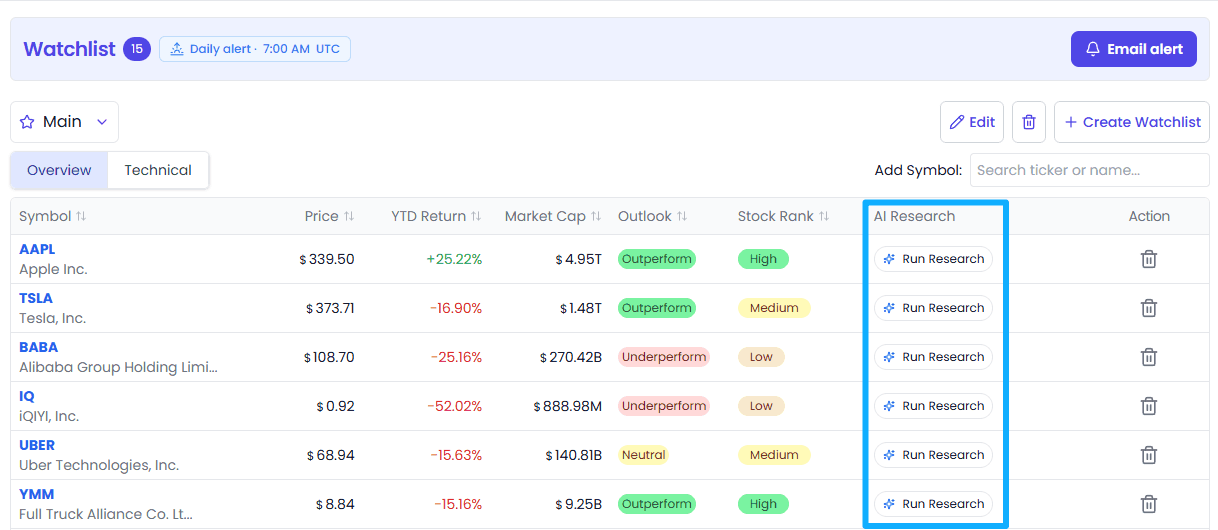
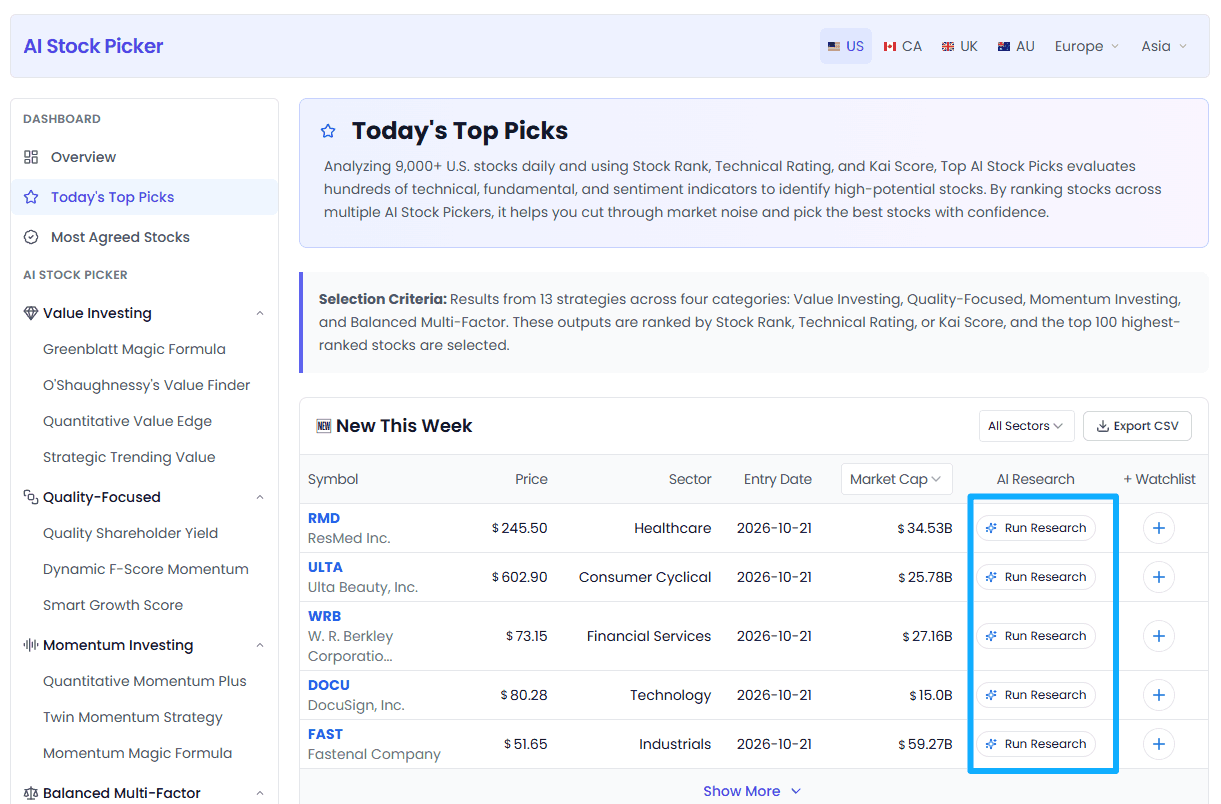
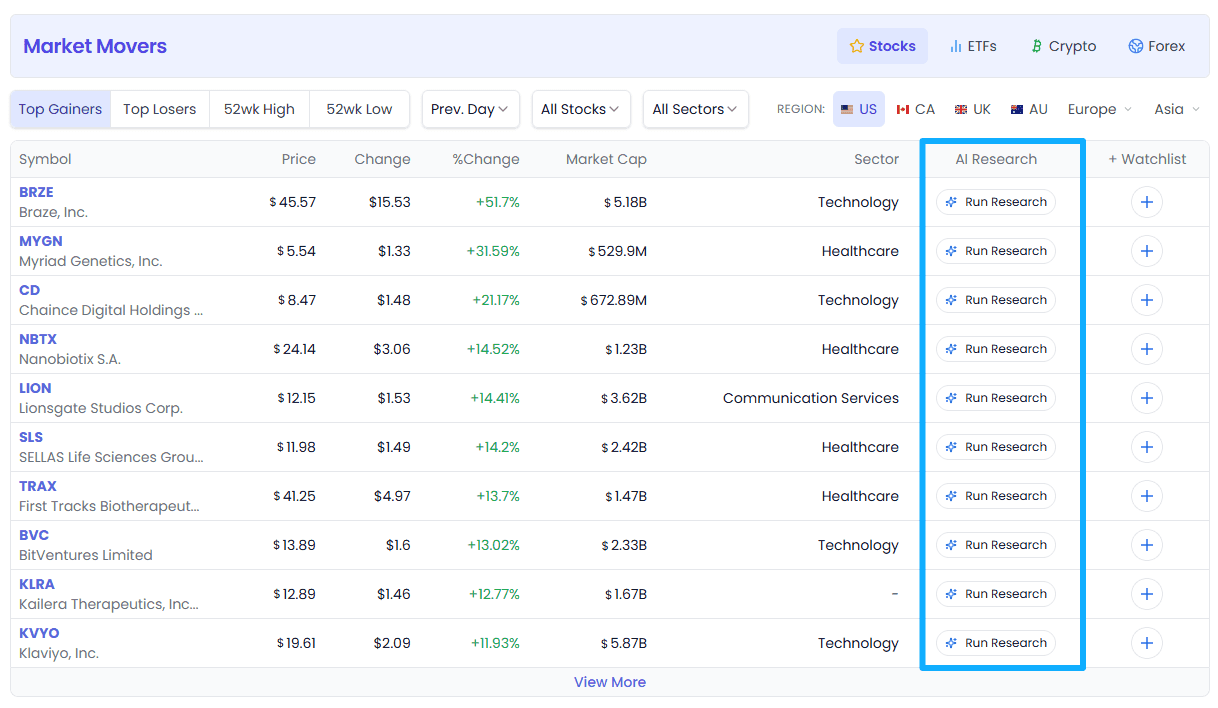
You can activate deep research on any ticker across multiple places in Kavout — directly from your Watchlist, AI Stock Picker, Market Movers page, or the Stock Details Page.
How to use:
- On your Watchlist, AI Stock Picker, Market Movers, or any Symbol Details Page, look for the "Run Research" or "AI Research" button next to the symbol you're interested in.
- Click it to launch a research agent tailored for that asset.
- Select the analysis type you want (Buy/Sell Rating, Technical Analysis, News Sentiment, Trade Spotting, or Fundamentals).
- Instantly receive real-time, comprehensive insights for that asset—no waiting for outdated analyst reports.
Below: Examples from Watchlist, AI Stock Picker, Market Movers, and Symbol Details Page
- Watchlist:
- AI Stock Picker:
- Market Movers:
- Symbol Details Page:
FAQ
Do AI analyses consume credits?
Yes. Running AI research agents consumes credits.
What happens when I run out of credits?
When credits are exhausted, clicking an agent pops up a top-up dialog where you can purchase more credits. Different membership tiers include different monthly credit quotas.
How long does analysis take?
Depends on the analysis type and market complexity:
- Simple analysis (e.g. News Sentiment): 10-20 seconds
- Complex analysis (e.g. Swing Trade, Technical): 20-40 seconds
- Market Outlook: 30-60 seconds (involves multiple indices)
Analysis is displayed in streaming output, so you can read along as it generates.
Can I save analysis results?
Yes. All AI analysis records are saved in InvestGPT history, available for review anytime. You can also copy analysis content or continue asking follow-up questions in the Drawer for deeper analysis.
Which markets' stocks are supported?
| Asset Type | Free Users | Pro Members |
|---|---|---|
| US Stocks | ✅ | ✅ |
| HK / EU / Other international markets | 🔒 Upgrade required | ✅ |
| ETFs | ✅ | ✅ |
| Cryptocurrencies | ✅ | ✅ |
| Forex | ✅ | ✅ |
| Commodities | ✅ | ✅ |
Free users see an upgrade prompt when selecting non-US symbols.
Are AI analyses accurate? Can I follow them blindly?
AI analysis is based on public data and model inference, for research reference only and does not constitute investment advice:
- AI makes mistakes too, especially in extreme market conditions
- Past analysis accuracy does not guarantee future performance
- Make decisions based on your own research and risk tolerance
- We recommend using AI analysis as a supporting tool, not your only source
Do Custom Instructions get saved?
Yes. Custom instructions you enter can be saved as a template for that agent, and will auto-load next time. Each agent can have its own independent custom template.
Why is Fundamental Analysis only for stocks?
Fundamental analysis relies on financial statement data (revenue, profit, balance sheet, etc.) — only stocks have this data. ETFs, cryptocurrencies, and forex don't have corresponding financial statements, so fundamental analysis isn't supported.
What's the difference between the two commodity agents?
The commodity section has two dedicated agents:
- Swing Trade Analysis — focuses on entry and exit timing, ideal for active traders
- Trend Analysis — focuses on the overall trend direction, ideal for position traders and investors
Both are tailored for commodity and futures markets, with analysis adapted to the unique characteristics of commodities like gold, oil, and corn.
Appendix: Agent Quick Reference
| Agent ID | Display Name | Category | Supported Assets | Recommended Use Case |
|---|---|---|---|---|
swing-trading | Swing Trade Analysis | I want to trade | Stocks/ETFs/Crypto/Forex | Medium-short term swing trading |
trading-signals | Trading Signals QuickView | I want to trade | Stocks/ETFs/Crypto/Forex | Signal snapshot |
technical-analysis | Technical Analyst | I want to trade | Stocks/ETFs/Crypto/Forex | Full technical overview |
buy-or-sell | Buy or Sell | I want to invest | Stocks/ETFs/Crypto/Forex | Buy/sell decisions |
fundamental-analysis | Fundamental Analyst | I want to invest | Stocks only | Financial/valuation |
market-outlook | Market Outlook | I want to read the market | Global market indices | Macro outlook |
news-sentiment | News Sentiment | I want to read the market | Stocks/ETFs/Crypto/Forex | Sentiment awareness |
swing-trading-commodity | Swing Trade Analysis | I want to trade commodities | Commodities/Futures | Commodity swing trading & timing |
trend-analysis | Trend Analysis | I want to trade commodities | Commodities/Futures | Trend direction for gold, oil, corn, etc. |
Getting Started: Key Takeaways
- Choose from 9 specialized agents across 4 categories — trading, investing, market reading, and commodities
- Access agents anywhere — Research page, stock detail page, InvestGPT, Watchlist, search, and more
- Use Custom Instructions to tailor analysis to your trading style and preferences
- Get tailored, real-time insights from specialized AI agents in seconds
- Never miss another opportunity—or get left behind by the pros.
The market never sleeps. Now, neither does your intelligence.
Ready to Hire Your AI Agent Team?
Stop fighting the market alone! With Kavout's Deep Research Agents, you get a 24/7 AI-powered team—always working for you:
- ✅ Instant intelligence
- ✅ Confident, rational decisions
- ✅ 24/7 opportunity detection
- ✅ Institutional-grade insights
Start now:
- Free users: 10 free research credits/month to try.
- Pro users: Check the pricing page for credit details.
We Want to Hear From You!
These features were built for you—and your feedback truly shapes our roadmap. If you have suggestions, questions, or ideas, please email us at support@kavout.co.
We review every message. If your feedback leads to an improvement or new feature that gets adopted, you'll receive a special award from us as a thank you!
Screenshots in this article: Actual product UI as of August 2026. For feedback or questions, reach out to our team anytime.