 Academy
Guru Portfolios
Track holdings and portfolio changes of 100+ top investment gurus — copy the playbook of billionaires
What is Guru Portfolios? What can it do for you?
What is Guru Portfolios?
Guru Portfolios tracks U.S. stock holdings data from the world's top institutional investors. These investment gurus, managing billions or even trillions of dollars, must file 13F reports with the U.S. SEC (Securities and Exchange Commission) every quarter to disclose their U.S. equity holdings.
We organize this public data so you can:
- View the latest holdings of legendary investors like Buffett, Dalio, and Ackman with one click
- Discover "consensus" stocks favored by multiple gurus simultaneously
- Track gurus' quarterly portfolio moves (new buys, adds, reduces, sold out)
- Filter gurus by investment style to find those that suit you
What Problems Can It Solve?
| Your Need | Corresponding Feature |
|---|---|
| 🎯 "What are the gurus buying? I want to copy them." | Guru List / Detail pages show each guru's full portfolio |
| 📊 "Which stocks are held by the most gurus at the same time?" | Consensus Picks |
| 🏆 "Which guru has the best recent performance?" | Scoreboard leaderboard |
| 🗺️ "Want to compare all gurus' top holdings side by side." | Top 10 Grid matrix |
| 🔍 "What portfolio changes has this guru made recently?" | Recent Changes on the Detail page |
| 💡 "I'm a value investor — recommend a few gurus with the same style." | Style filter |
Where does the data come from? Is it accurate?
- Primary source is the SEC 13F report: institutions with over $100M in assets under management must disclose U.S. equity holdings within 45 days after each quarter-end
- Supplementary sources are 13D / 13G filings: required within 5 business days when ownership exceeds 5%, more timely
- Data reflects public disclosures as-is, does not constitute investment advice — please combine with your own research and judgment
⚠️ Timeliness note: 13F is quarterly data — by the time you see it, the actual holdings may be 1-4 months old. Gurus may have already adjusted their positions. Don't blindly copy.
Quick Start: 3 Steps for Beginners
Access
- Left sidebar → Guru Portfolios
- URL: https://www.kavout.com/guru-portfolios
- 💡 Sub-pages (Consensus Picks / Scoreboard / Top 10 Grid, etc.) are switched via the left menu — state is not reflected in the URL. Default opens to the Guru List page.
Step 1: Start with Consensus Picks to Find Institutional Consensus
Open Consensus Picks in the left sidebar — here you'll see stocks held by the most gurus simultaneously. The more gurus holding a stock, the stronger the institutional consensus, making it an excellent starting point for stock selection.
Sort by "# Gurus Own" from high to low and see how many gurus hold the stocks you recognize.
Step 2: Browse the Scoreboard to Find Gurus You Want to Follow
Open the Scoreboard, ranked by 3-year return from highest to lowest, to find gurus with strong long-term performance. When you see one you're interested in, click the name to enter the detail page and study their holding style.
Don't just look at returns — also consider AUM (assets under management) and investment style: small funds can operate flexibly, while large funds are steadier but with less upside.
Step 3: Enter Guru Detail to Deep-Dive into a Guru
Click any guru in the Guru List or Scoreboard, and the detail page will show:
- Basic info: AUM, returns, turnover, investment style
- This quarter's changes: what they newly bought, what they added to, what they sold out of (the most valuable part!)
- Full holdings list: all positions, searchable and sortable
- Sector breakdown: which sectors this guru is heavy in
Focus on "New Buy" and "Sold Out" — new positions and full exits represent real changes in conviction, stronger signals than adds or reduces.
Four Pages in Detail
1. Guru List
Left icon: ⭐ One-liner: Browse all gurus, filter by style/performance, find the ones you want to follow
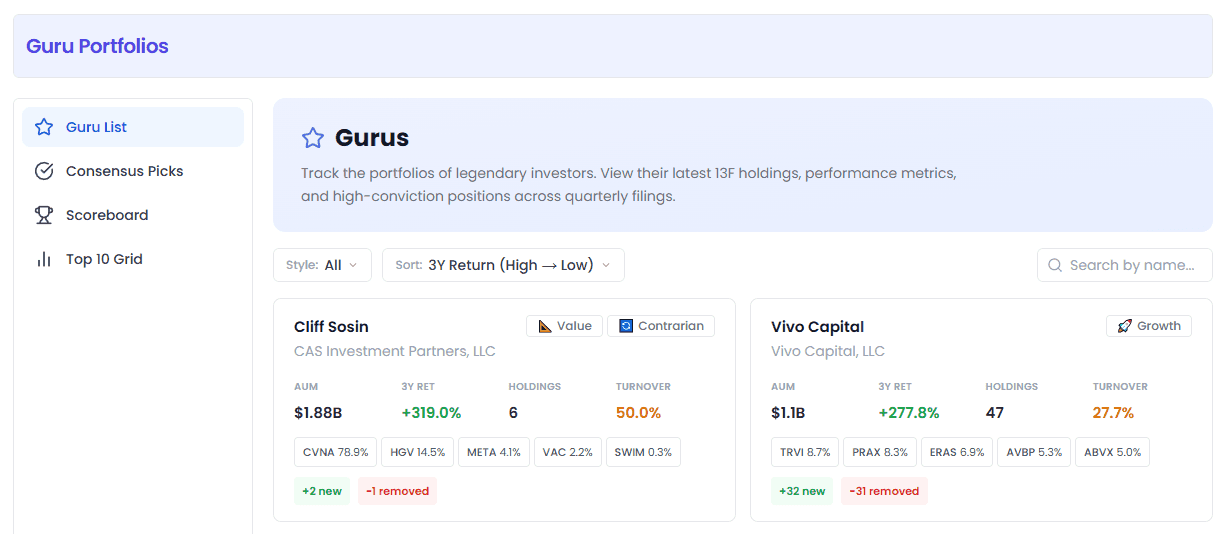
Top Filters
| Filter | Purpose |
|---|---|
| Style | Filter by investment style, e.g. Value, Growth, Deep Value, Long-Term, etc. |
| Sort | AUM (largest first) / 3Y Return (highest first) / Turnover (lowest first) |
| Search box | Search by guru name or firm, e.g. search "Buffett" to find Warren Buffett directly |
How to Read Guru Cards?
Each card represents one investment guru and contains this info:
| Info | Meaning | How to Use |
|---|---|---|
| Manager / Firm | Fund manager name + firm | See if you recognize them; if not, you can look up their background |
| Style tags | Investment style classification (max 2 shown) | Quickly judge if they're your type |
| AUM | Assets Under Management | Larger = harder to maneuver flexibly, but usually more stable |
| 3Y Ret | 3-year cumulative return (calculated from top 10 holdings) | Core reference for long-term performance — green for gains, red for losses |
| Holdings | Number of stocks held | Few = concentrated (high conviction), many = diversified |
| Turnover | Turnover rate | Low = long-term holder (🐢 Buffett-style), High = frequent trader (>25% flagged in orange) |
| Top 5 chips | Top 5 holdings + weight | Quickly understand what the guru is betting on; click tickers for stock details |
| +N new / -N removed | New positions / exits this quarter | Bigger number = more activity this quarter, worth clicking into |
Common style tags quick reference:
| Style | Icon | Meaning |
|---|---|---|
| Value 📐 | Value Investing | Buy undervalued stocks, Graham-Dodd school |
| Growth 🚀 | Growth Investing | Buy high-growth companies, willing to pay a premium for growth |
| Deep Value 🔍 | Deep Value | Specialize in bargain hunting, early Buffett style |
| Long-Term ⏳ | Long-Term Holder | Average holding period 3+ years |
| Concentrated 🎯 | Concentrated | Few but high-conviction holdings, high single-stock weight |
| Low Turnover 🐢 | Low Turnover | Barely trades, buy and hold |
| Moat 🏰 | Moat | Prefer companies with competitive barriers |
| Activist ⚖️ | Activist Investor | Gets involved in company operations after buying |
| AI Thematic 🤖 | AI Theme | Heavy in AI-related companies |
💡 Tip: Click a style tag in the Scoreboard to directly filter all gurus with that style.
2. Consensus Picks
Left icon: ✅ One-liner: Stocks held by the most gurus simultaneously — picks with the highest institutional consensus
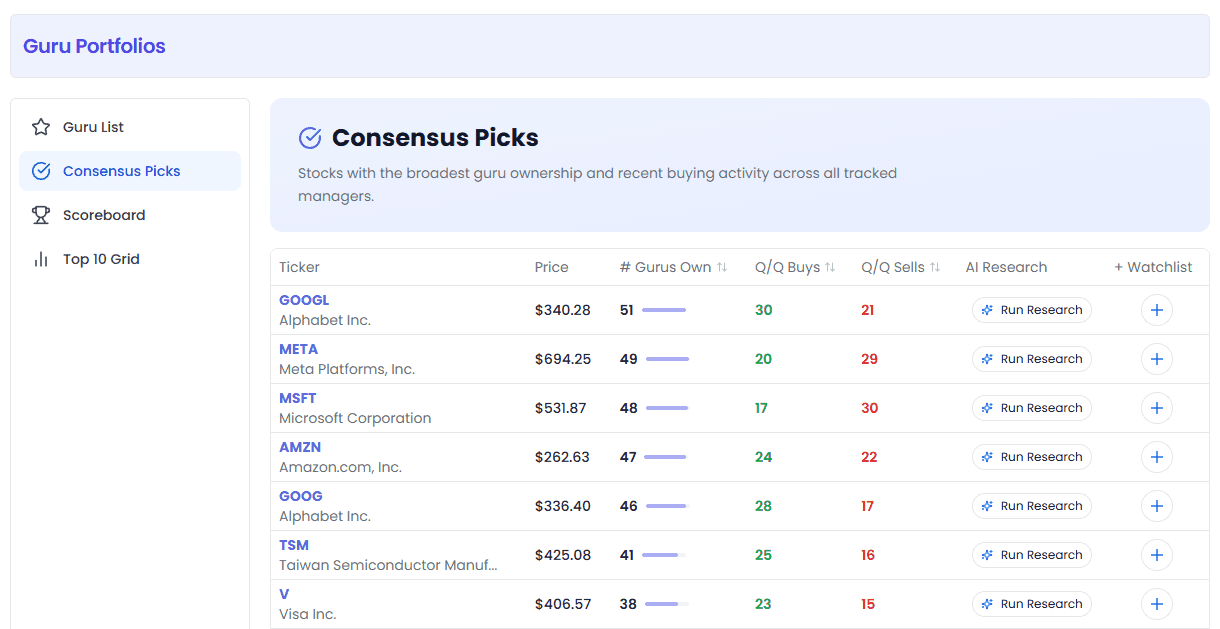
What is this?
Aggregate all gurus' holdings together and count how many gurus hold each stock. The more gurus holding it, the stronger the institutional conviction.
Table Columns
| Column | Meaning |
|---|---|
| Ticker | Stock symbol + company name, click to open stock popup |
| Price | Current stock price |
| # Gurus Own | Number of gurus holding this stock (with progress bar — more = stronger consensus) |
| Q/Q Buys | Number of gurus that added this stock in the last quarter (green = institutions buying) |
| Q/Q Sells | Number of gurus that sold this stock in the last quarter (red = institutions selling) |
| AI Research | AI research button — one-click analysis of this stock |
| + Watchlist | Add to watchlist |
How to Use It?
- Sort by # Gurus Own → find "bedrock" stocks with the highest institutional consensus (usually large-caps like AAPL, MSFT)
- Sort by Q/Q Buys → find stocks being heavily accumulated by institutions in the most recent quarter (more time-sensitive)
- Sort by Q/Q Sells → see which stocks institutions are dumping, for risk avoidance
- Compare buys vs sells — Buys far greater than Sells → institutions are collectively building positions, worth deep study
- Sells far greater than Buys → institutions are retreating, watch for risk
3. Scoreboard
Left icon: 🏆 One-liner: All gurus ranked by performance — find the one who makes the most money
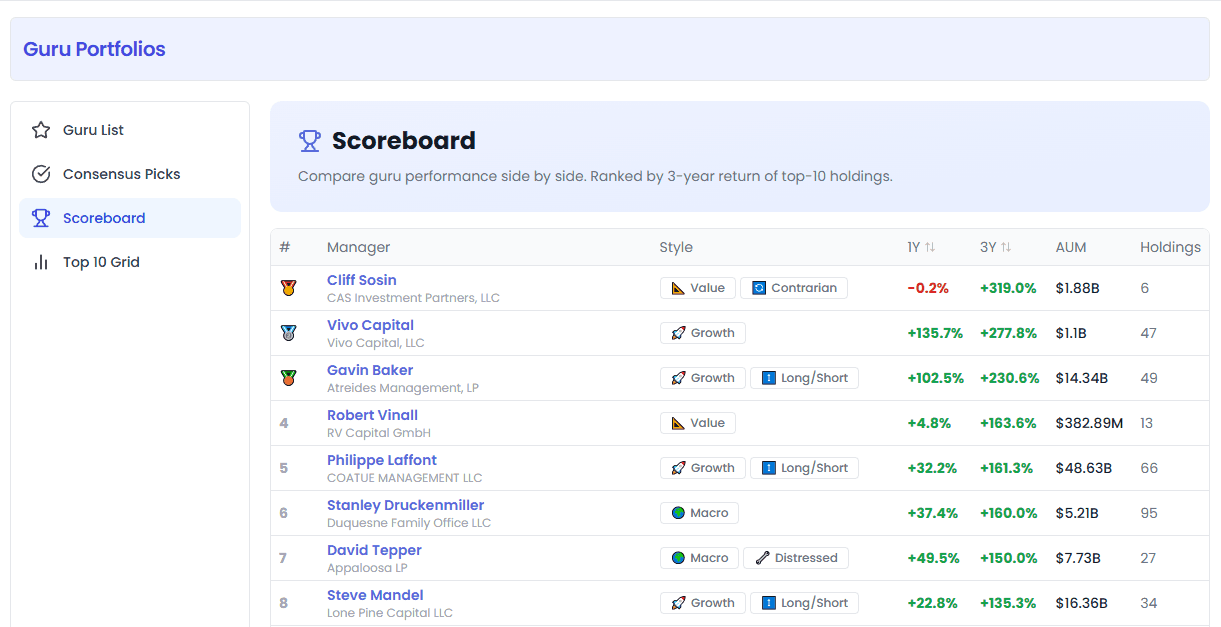
What is this?
All gurus ranked by return rate, with 🥇🥈🥉 medals for the top three. Defaults to 3-year return descending (long-term performance is more valuable as a reference).
Table Columns
| Column | Meaning |
|---|---|
| # | Rank — top three are medal icons |
| Manager | Fund manager — click name to enter detail page |
| Style | Investment style tags — click a tag to filter gurus of that style |
| 1Y | Trailing 1-year return |
| 3Y | Trailing 3-year return |
| AUM | Assets under management |
| Holdings | Number of holdings |
How to Use It?
- Beginners: just look at the top 10, study their holdings (click name for details)
- Advanced: click column headers to sort by 1Y or 3Y, compare short-term vs long-term performance
- High 1Y but low 3Y → may just be lucky or got the style right
- High and stable 3Y → real skill, worth long-term following
- Style filter: click a tag in the Style column, e.g. click "Value" to see only value-oriented gurus' rankings
💡 Pro tip: Return figures are calculated based on their top 10 holdings' price changes — not equivalent to actual fund NAV, but useful as a relative comparison.
4. Top 10 Grid
Left icon: 📊 One-liner: Side-by-side comparison of all gurus' top 10 holdings — see at a glance who is buying what
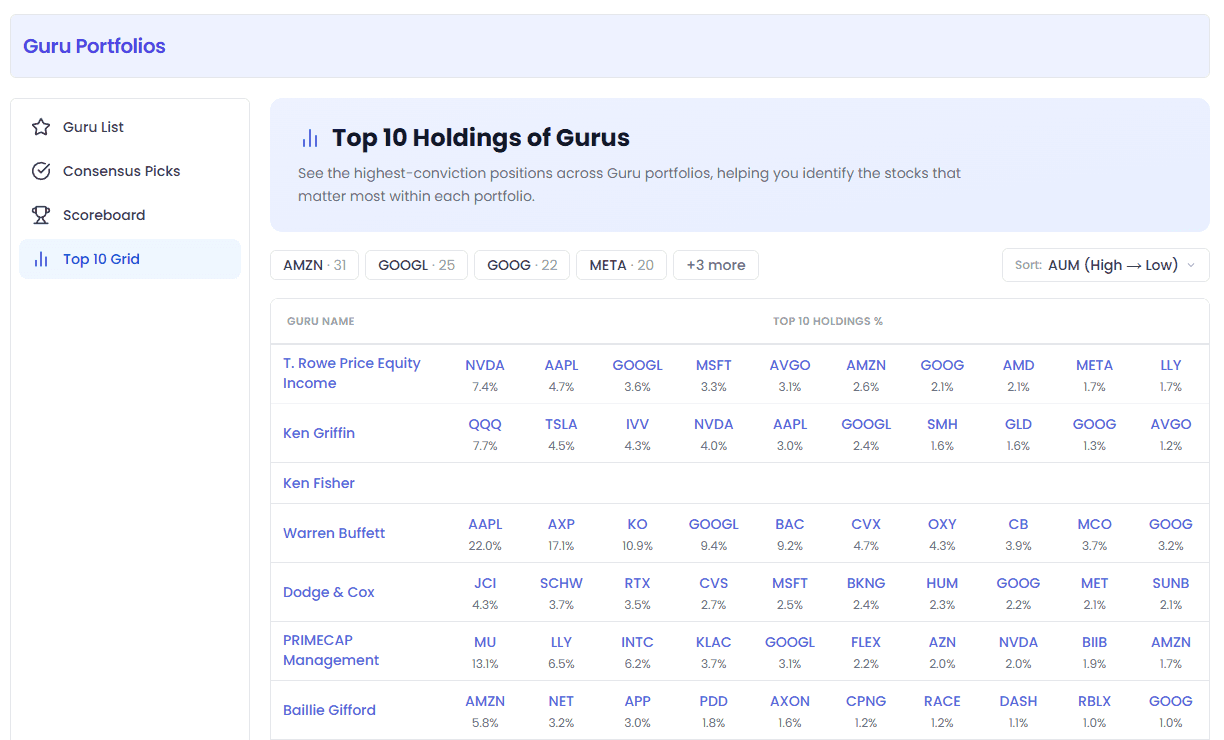
What is this?
A matrix table: rows are gurus, columns are their top 10 holdings and portfolio weights. A horizontal scan lets you compare allocation differences across gurus.
Top Hot Stocks Bar
At the very top of the page is a row of the most widely-held hot stocks (e.g. AAPL, MSFT) — click to jump to stock details. Acts as a "quick access" panel.
How to Read the Table?
| Element | Meaning |
|---|---|
| First column on the left | Guru name — click to enter detail page |
| Next 10 columns | The guru's top 10 holdings, with percentage weights below |
| Blue clickable tickers | Can be clicked to jump to stock popup |
Usage Examples
"What's the difference between Buffett's and Munger's portfolios?"
- Find both rows in the Top 10 Grid, compare top 10 holdings side by side
- Overlapping stocks = "consensus picks" both agree on
- Areas of big difference = each one's independent judgment, worth deeper study
"Which stocks are heavily held by multiple gurus at the same time?"
- Scroll down the table and see which tickers appear repeatedly
- Same-sector stocks appearing multiple times = that sector is the current institutional consensus direction
Guru Detail Page — Deep Guide
Clicking a guru's name on any page takes you to the detail page. This is the most information-dense page and well worth studying carefully.
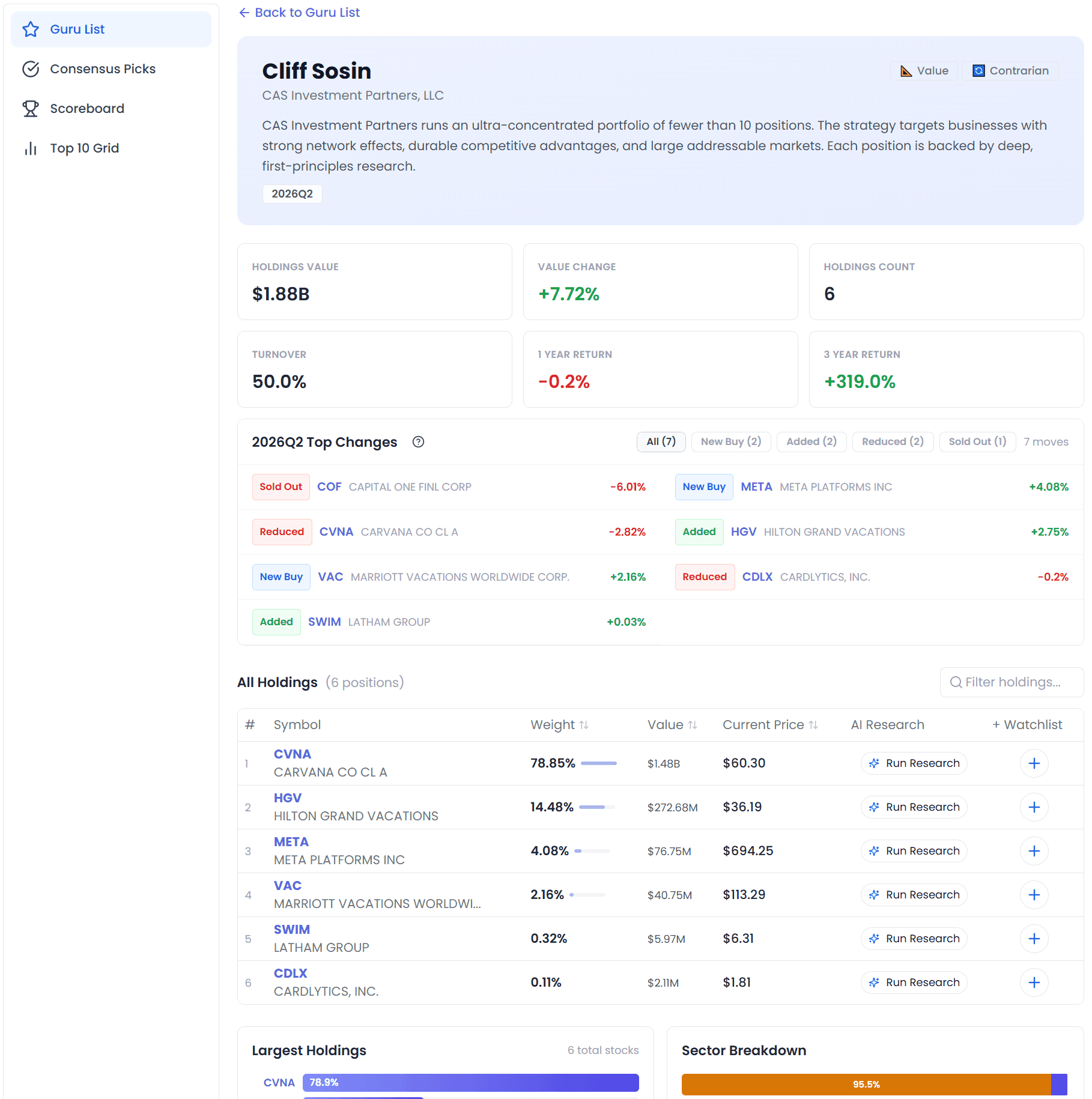
Top: Guru Profile Card
| Info | Meaning |
|---|---|
| Name + Firm | Fund manager and their fund company |
| Style tags | Investment style classification (can be multiple) |
| Bio | The guru's investment philosophy, background intro (if available) |
| Quarter label | The quarter this data corresponds to (e.g. 2026Q1) |
Six Core Metrics
| Metric | Meaning | What to Watch |
|---|---|---|
| Holdings Value | Total portfolio market value | Scale — larger = more influence |
| Value Change | This quarter's change in portfolio value | Big increase = they added to positions; big decrease = they reduced (could also be from price moves) |
| Holdings Count | Number of stocks held | Few = concentrated, many = diversified |
| Turnover | Turnover rate | Low = long-term holder type, High = frequent trader type |
| 1 Year Return | Trailing 1-year return | Short-term performance |
| 3 Year Return | Trailing 3-year return | Long-term performance, more valuable |
Most Important: Recent Changes
⭐ This is the most valuable part of the detail page. What they hold is just "what's already there" — but changes represent the guru's latest judgment.
Four Types of Changes
| Type Label | Color | Meaning | Signal Strength |
|---|---|---|---|
| New Buy | 🔵 Blue | Brand new position — wasn't there last quarter, newly bought this quarter | ⭐⭐⭐⭐⭐ Strongest signal |
| Added | 🟢 Green | Added to — already had a position, bought more | ⭐⭐⭐⭐ |
| Reduced | 🟠 Orange | Reduced — sold part of the position but still holding | ⭐⭐ Depends |
| Sold Out | 🔴 Red | Sold out — sold everything, completely exited | ⚠️ Strong warning |
How to Read Portfolio Changes?
- New Buy stocks deserve priority study — gurus decide to buy new positions after research, meaning they find the current price attractive
- Sold Out deserves extra attention — if it's a stock you hold, think about why the guru exited
- Added and Reduced are relatively mild — position adjustments may just be rebalancing, not a reversal of conviction
- Can filter by type — 5 buttons at the top (All / New Buy / Added / Reduced / Sold Out), numbers show the count for each
Click the ❓ help icon next to a change item for more detailed interpretation guidance.
All Holdings
A complete table of all holdings, showing the first 20 by default. Click "Show all" to expand the full list.
Operations you can do:
- 🔍 Search & filter: top-right search box, enter ticker or company name to find quickly
- ↕️ Sort by column: click Weight, Value, Current Price headers to toggle ascending/descending
- 🤖 AI Research: every stock has an AI analysis button
- ⭐ Add to watchlist: one-click add to your watchlist
Columns
| Column | Meaning |
|---|---|
| # | Rank number (sorted by portfolio weight) |
| Symbol | Ticker + company name |
| Weight | Portfolio weight (with progress bar — higher weight = more important) |
| Value | Holding market value (dollar amount) |
| Current Price | Current stock price |
| AI Research | AI research button |
| + Watchlist | Add to watchlist |
Two Charts at the Bottom
Largest Holdings (bar chart)
A horizontal bar chart of the top 10 holdings — see at a glance:
- Which stock is the "#1 holding" (the longest bar)
- Whether the top 10 weights are evenly distributed
- How concentrated the portfolio is (top holding at 40%+ = very concentrated)
Sector Breakdown
Pie chart + detailed list, showing this guru's sector allocation:
- Which sectors are heavy (high weight)
- Whether investment is concentrated in a few sectors or diversified
- Whether it matches your sector preferences
💡 How to use: if you're bullish on tech, follow gurus with high Technology weight; if you want balanced allocation, find gurus with even sector distribution.
Bottom Data Source Info
- Reporting Period: reporting period (quarter-end the holdings correspond to)
- Filing Date: date filed with the SEC
- SEC Source: link to original SEC filing (can jump to sec.gov to verify)
Usage Scenarios
Scenario 1: I'm a beginner — want to copy the best gurus
- Open Scoreboard, sort by 3-year return descending
- Click into the top three, see if you agree with their holdings
- Look at Recent Changes → New Buy — these are their newly initiated positions
- Pick 2-3 you also like, add to watchlist for ongoing tracking
Recommendation: don't just follow one guru — diversify across 3-5 different styles to reduce the risk of any single guru being wrong.
Scenario 2: I want "safe" stocks with high institutional consensus
- Open Consensus Picks
- Sort by "# Gurus Own" descending
- Find stocks that meet all of these conditions:
- High number of gurus holding (≥20)
- Q/Q Buys > Q/Q Sells (still being accumulated)
- Sector you believe in
- Add to watchlist, watch for dips to enter
Scenario 3: I want to find deep-value style gurus
- On the Guru List page
- Style dropdown → "Deep Value"
- Sort → "3Y Return", see who performs best among value investors
- Click in to see their holdings and learn what value investors are buying
Scenario 4: I want to buy a stock — let's see what gurus think
Method 1:
- Search the ticker in Consensus Picks
- See how many gurus hold it, and whether they've been buying or selling recently
Method 2:
- Quick scan in the Top 10 Grid, see which gurus have it in their top 10
- If it appears repeatedly, it's an institutional heavyweight
Scenario 5: Every earnings season — quickly see what gurus changed
- After the new quarter's 13F disclosures are complete (usually ~45 days after quarter-end: mid-February, mid-May, mid-August, mid-November)
- Open the detail pages of the few gurus you follow
- Go straight to Recent Changes → New Buy
- Compare New Buys across different gurus together
- If multiple gurus simultaneously initiated a position in the same stock → priority research candidate
FAQ
What is a 13F report?
Form 13F is a quarterly report required by the U.S. SEC for institutional investors. Institutions with over $100 million in assets under management must disclose their U.S. equity holdings within 45 days after each quarter-end. This is the primary data source for Guru Portfolios.
How often is the data updated?
- Mainly quarterly updates, following 13F filings
- If there are 13D/13G disclosures (ownership exceeding 5%), updates are faster (within 5 business days)
- Each new quarter disclosure season (mid-February, May, August, November) is when content is richest
Why is some guru data in English?
Because the data comes from U.S. SEC public filings — company names, people names, and sector classifications are directly translated/retained from English. This is also standard practice for professional financial data.
How are return figures calculated?
The 1Y/3Y returns shown on the page are calculated from price changes in that guru's top 10 holdings. They are not equivalent to actual fund NAV (since 13F only discloses U.S. long equity positions — not cash, bonds, shorts, derivatives, etc.). They can serve as a reference for relative comparison, but not as precise fund performance.
Is high turnover better or low turnover better?
No absolute answer — it depends on style:
- Low turnover (<10%) = long-term holder type, exemplified by Buffett. Good for investors who don't want to trade frequently
- Medium turnover (10%-25%) = moderate position changes, most gurus fall in this range
- High turnover (>25%) = frequent trading, may be quantitative or event-driven strategies. Higher risk and volatility
Should I just copy gurus' trades directly?
Not recommended to blindly copy, for these reasons:
- Timeliness issues: by the time 13F is disclosed, holdings may be 1-4 months old — gurus may have already sold
- Different allocation purposes: a guru buying a stock might be for hedging or arbitrage, not necessarily because they're simply bullish
- Different risk tolerance: gurus' capital size, investment horizon, and portfolio structure are all different from yours
- Gurus make mistakes too: nobody wins 100% of the time
The right way to use it: treat guru holdings as inspiration for stock picks and a starting point for research, then make decisions with your own judgment after studying.
Why do some stock prices show # or aren't clickable?
If the asset type is marked as #, it means this stock can't be navigated to temporarily (may be OTC securities, non-U.S. stocks, or no detail data available yet). Most U.S. stocks are clickable for details.
Screenshots in this article: Actual product UI as of August 2026. For feedback or questions, reach out to our team anytime.
My Portfolios
One-stop portfolio management with broker account auto-sync and AI-powered diagnostics — connect your brokerage accounts and track holdings, P&L, and AI insights in real time
Portfolio Toolbox
One-stop portfolio toolkit — Build, Diagnose, Optimize — freely adjust factor weights with AI-driven professional portfolio analysis