 Academy
Market Calendar
Your all-in-one financial calendar — earnings, dividends, economic data, IPOs, holidays — all the important dates that move markets in one place.
📌 What is Market Calendar?
Market Calendar is a financial calendar tool that helps you know in advance "what's happening when."
Big market moves are rarely random — earnings releases, central bank rate decisions, GDP announcements, IPO listings... all these events move stock prices. Market Calendar brings all these important events together in one place so you can:
- 📅 Plan ahead — know what big events are coming next week, manage your positions in advance
- 🔍 Discover opportunities — find beat-the-expectation stocks during earnings season, find high-yield stocks during dividend season
- 🌍 Global view — not just U.S. stocks, economic data from all major economies worldwide
- ⏰ Set alerts — never miss important events
🚀 Quick Start: 3 Steps to Master the Financial Calendar
Step 1: Choose a Calendar Type
The left sidebar lists all available calendar types:
| Icon | Calendar | What to See |
|---|---|---|
| 📈 | Economic | Economic data & central bank events (CPI, Nonfarm Payrolls, Fed decisions, etc.) |
| 📊 | Earnings | Earnings releases (EPS, revenue vs. expectations) |
| 🪙 | Dividends | Dividend ex-dates, payout amounts, dividend yields |
💡 Additional types like Splits, IPO, and Holidays are also available — enable them as needed.
Step 2: Select a Time Range
The top toolbar lets you choose which period to view events for:
- Yesterday
- Today (default)
- Tomorrow
- This Week
- Next Week
- Custom — custom date range (click date picker)
Step 3: Browse the Table, Deep-Dive into Research
The table is grouped by date, with each day's events listed together. You can:
- Click a stock ticker → open detail popup, view chart and more data
- Click the bell 🔔 → set an event alert
- Filter by impact level, region, etc. (Economic calendar)
📅 Calendar Types in Detail
1. 📈 Economic Calendar
Macroeconomic data and central bank events — the "big news" that moves the entire market.
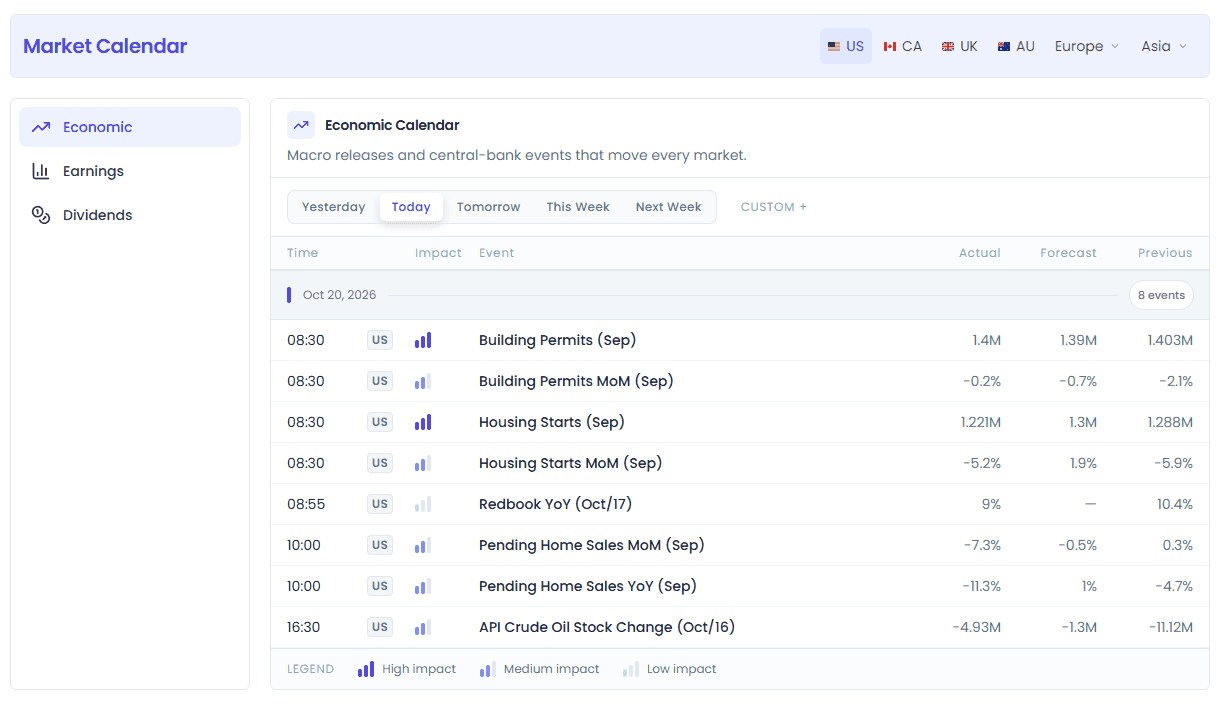
What You Can See
| Column | Description |
|---|---|
| Time | Data release time |
| 🏳️ | Country/region (abbreviation code, e.g. US, EU, JP) |
| Impact | Impact level — 3 bars = high, 2 bars = medium, 1 bar = low |
| Event | Event name (e.g. "CPI (MoM)", "Fed Interest Rate Decision") |
| Actual | Actual released value |
| Forecast | Market expected value |
| Previous | Previous value (last release's data) |
How to Read Impact Levels
A legend at the bottom explains:
- 🟪 High impact (3 bars) — likely to cause market volatility, e.g. Fed rate decisions, Nonfarm Payrolls, CPI
- 🟪 Medium impact (2 bars) — some effect, e.g. retail sales, PMI flash
- ⬜ Low impact (1 bar) — market usually reacts mildly
💡 Around high-impact event releases, market volatility rises significantly. If you trade short-term, pay special attention to these time points.
Common Economic Data Types
| Category | Typical Events | Why It Matters |
|---|---|---|
| Inflation | CPI, PCE, PPI | Directly affects central bank rate decisions |
| Employment | Nonfarm Payrolls, Unemployment Rate, Initial Jobless Claims | Reflects economic health — one of the Fed's most watched data points |
| Central Banks | Rate decisions, monetary policy statements, central bank speeches | Interest rate direction determines asset prices |
| GDP / Growth | GDP QoQ/annualized, growth data | Measures overall economic speed |
| Sentiment | Consumer Confidence, Manufacturing PMI | Forward-looking indicators, signal economic direction |
| Trade | Trade balance, import/export data | Affects currency rates and multinational corporate earnings |
How to Read Data After Release
After release, Actual is compared against Forecast:
- Actual > Forecast (positive data) → usually bullish for that country's currency / stock market
- Actual < Forecast (missed expectations) → usually bearish
- The bigger the gap, the sharper the market reaction
⚠️ Market reaction doesn't always follow "common sense" — sometimes "better than expected" causes a sell-off because expectations were already priced in. Judge based on market position and sentiment combined.
2. 📊 Earnings Calendar
Quarterly corporate earnings — one of the biggest catalysts for stock price movement.
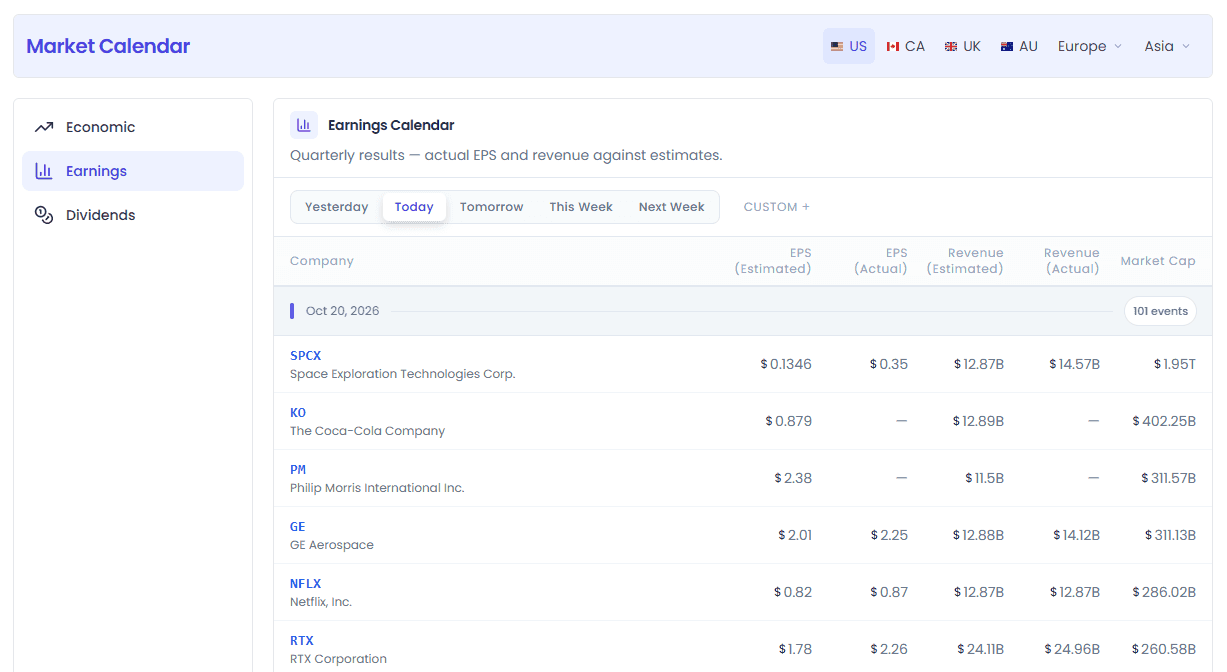
What You Can See
| Column | Description |
|---|---|
| Company | Company (ticker + name), click to open details |
| EPS (Estimated) | Expected earnings per share |
| EPS (Actual) | Actual EPS (shown after release) |
| Revenue (Estimated) | Expected revenue |
| Revenue (Actual) | Actual revenue (shown after release) |
| Market Cap | Market capitalization |
How to Use It
- Before earnings: check when your holdings report, decide whether to reduce position ahead of time to avoid risk
- After earnings: find stocks that beat expectations — may have follow-through momentum
- During earnings season: scan daily earnings each day, discover opportunities the market is overlooking
💡 Large-cap earnings move indices more (e.g. Apple, Microsoft, Nvidia); small-cap earnings produce sharper volatility.
3. 🔨 Dividends Calendar
Stock dividend information — essential for income investors.
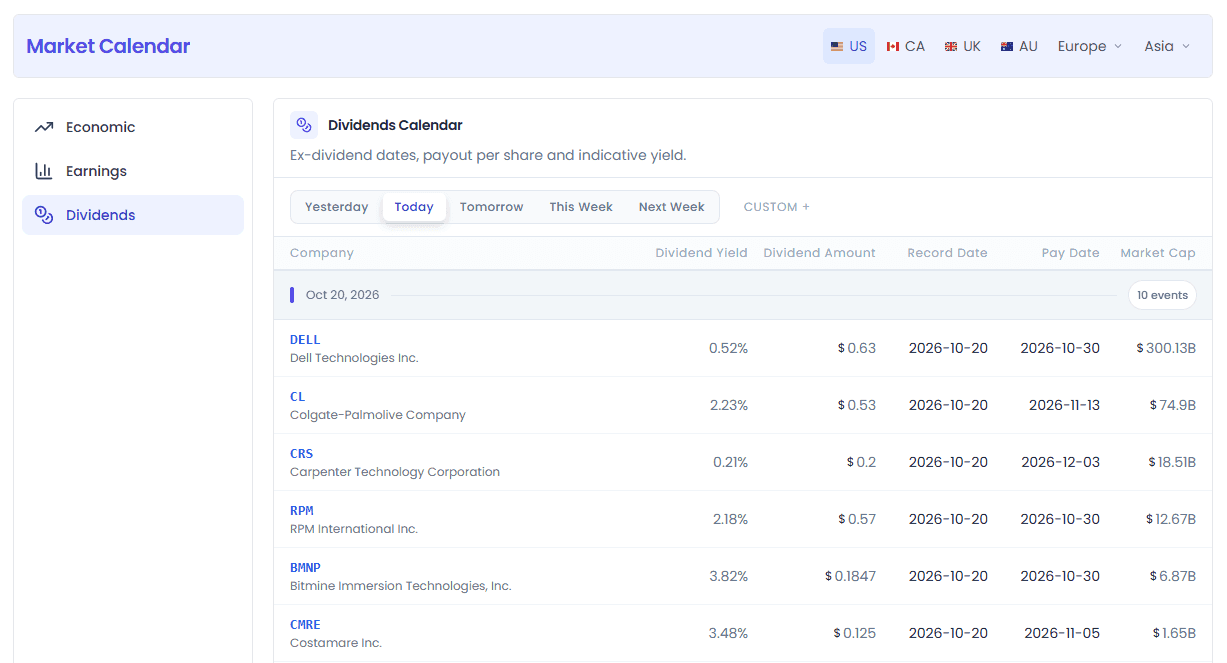
What You Can See
| Column | Description |
|---|---|
| Company | Company (ticker + name) |
| Dividend Yield | Dividend yield (annualized) |
| Dividend Amount | Dividend per share |
| Record Date | Record date — you must hold the stock on this date to receive the dividend |
| Pay Date | Payment date — the day the dividend actually hits your account |
| Market Cap | Market capitalization |
Key Dates Explained
Many people confuse dividend dates — here's the full picture:
- Declaration Date — the company announces the dividend (usually not shown on the calendar)
- Ex-Dividend Date — stocks bought on or after this date do not qualify for this dividend. You must buy before the ex-date to receive it.
- Record Date — the company uses this day's shareholder register to pay dividends (usually 1-2 trading days after the ex-date)
- Pay Date — the day the dividend is actually deposited into your account
🔑 Key rule: as long as you hold the stock before the ex-dividend date (not including the ex-date itself), you'll get the dividend. On the ex-date itself, the opening price is usually automatically reduced by the dividend amount.
Practical Tips
- To find high-yield stocks, sort by the Dividend Yield column
- Note: high yield ≠ good investment — some companies have high-looking yields because the stock price has crashed, and fundamentals may be troubled
- Dividends are taxed — the exact rate depends on your account type and location
⚙️ Features in Detail
Region Selector
Switch regions from the top-right of the page to view financial calendar data for different countries/regions.
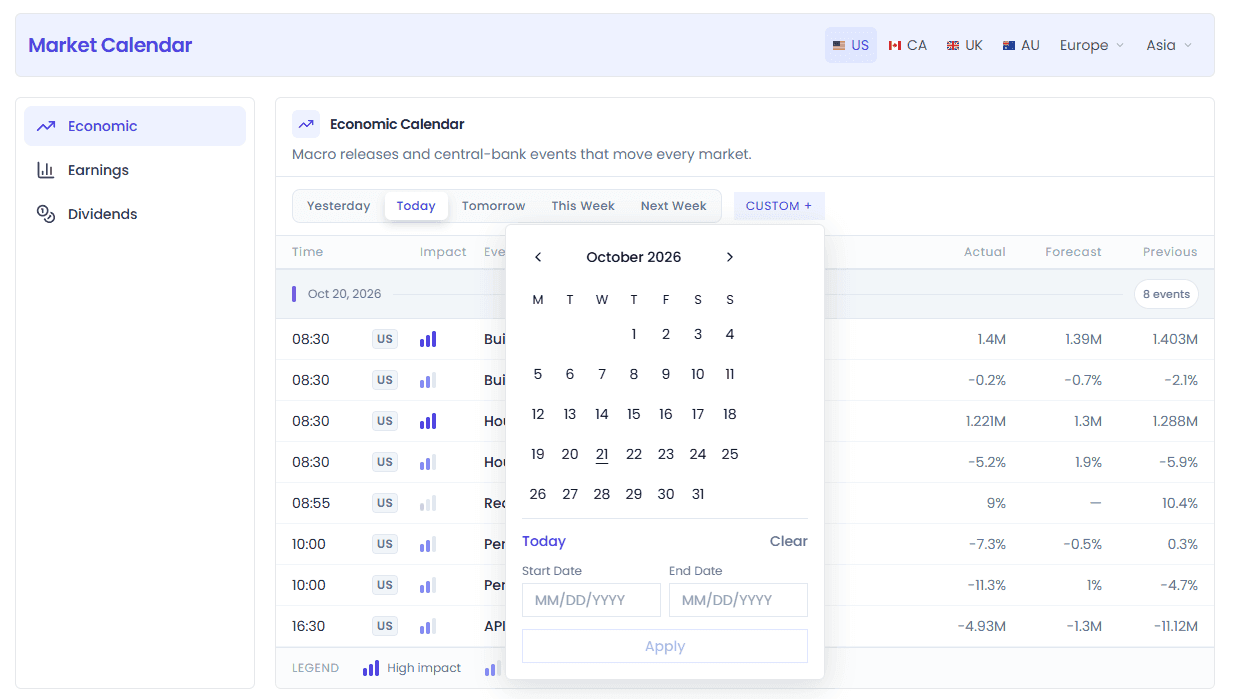
- US — United States (default, most comprehensive data)
- Other major economies are also supported
After switching regions, all calendar data updates to the corresponding region's events.
Time Range Selection
The time switcher in the top toolbar:
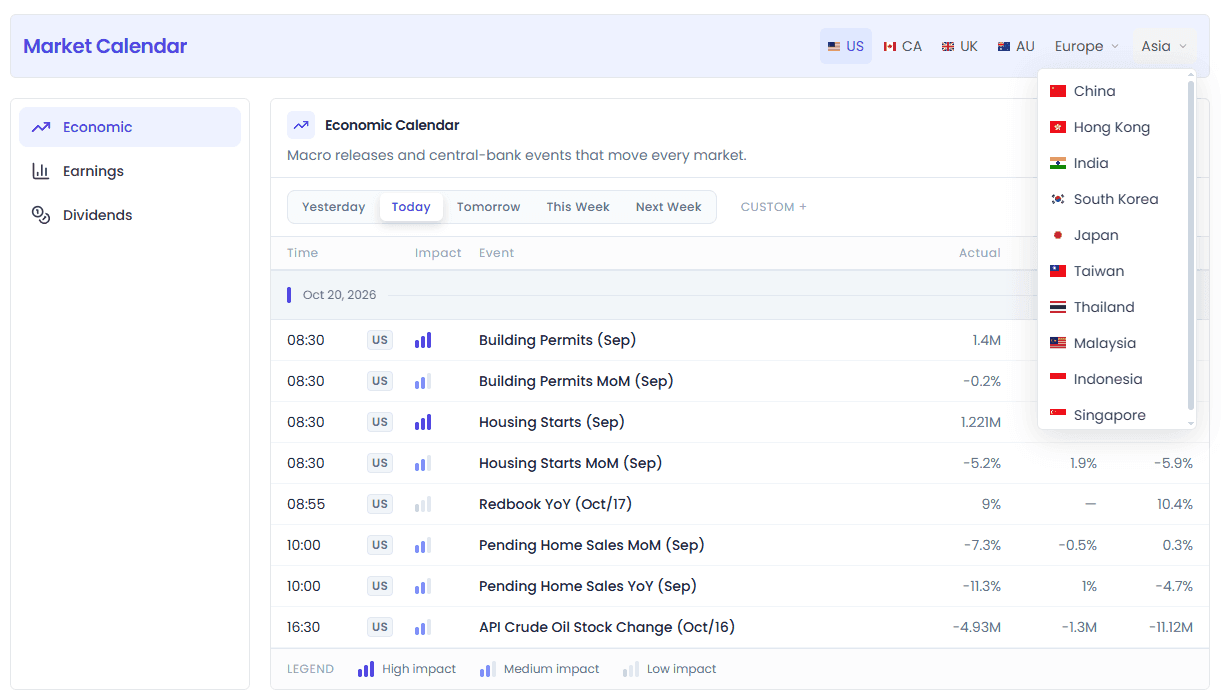
Desktop
- Segmented buttons: Yesterday / Today / Tomorrow / This Week / Next Week
- Custom date picker on the far right, select any start/end date
Mobile
- Merged into a single dropdown menu with all options inside
Grouped by Date
When you select This Week / Next Week / a custom range, events are displayed grouped by date:
- Each day has a gray group header bar with a purple vertical bar marker on the left
- The right side shows the total number of events that day
- Group headers are sticky (stay at the top while scrolling) so you always know what day you're viewing
LIVE Badge
Ongoing events (e.g. Fed press conferences, earnings calls) feature:
- 🟡 LIVE badge (yellow, with a pulsing dot)
- Light yellow highlighted row background
- Yellow vertical bar marker on the left
Instantly see which events are happening right now.
🔔 Event Alerts
Each row has a bell button on the far left:
- Click once and the bell turns gold = alert set
- Click again to cancel
After setting an alert, you'll receive a notification when the event happens (the exact notification method depends on your account settings).
Stock Detail Popup
In Earnings and Dividends calendars, clicking a company ticker (blue bold stock ticker) opens a detail window where you can view:
- Real-time price and chart
- Company basic info
- AI research analysis
- More related data
Quickly research a stock without leaving the calendar page.
Empty States & Loading
- Loading: shows spinner animation and "Loading..."
- No matching results: shows empty state icon telling you to "clear some filters to see more results"
💡 5 Typical Use Cases
Scenario 1: Daily Earnings Season Tracking
You're an active investor and want to know which important companies report earnings each day during earnings season.
Steps:
- Open Market Calendar → Earnings
- Time = "Today"
- Quick scan of companies reporting that day
- For companies you're interested in, click the ticker for details to see expected EPS and revenue
- For stocks you hold, set alerts to be notified when earnings are released
Advanced play: set time to "This Week" to plan this week's earnings schedule in advance and manage positions for important companies.
Scenario 2: Macro Traders Watching the Fed
You trade forex, indices, or gold, and Fed rate decisions are your most-watched events.
Steps:
- Open Economic Calendar
- Time = "This Week" or "Next Week"
- Scan high-impact (3-bar) events
- Find "Fed Interest Rate Decision" or related events
- Click the bell to set an alert — notified before the announcement
- On release day, watch the Actual vs Forecast gap to judge market impact
Why it's useful: around Fed rate decisions, U.S. stocks, gold, and the dollar index usually see big moves. Knowing the time in advance lets you prepare.
Scenario 3: Value Investors Looking for High-Dividend Stocks
You're a value investor looking for stocks with high dividend yields and solid fundamentals.
Steps:
- Open Dividends Calendar
- Time = "This Week" or "Next Week"
- Sort by Dividend Yield descending
- Focus on:
- Yield > 3%
- Large-caps (high market cap, relatively stable)
- Companies with many consecutive years of dividends (click in to see details)
- For candidate stocks, add to watchlist for ongoing tracking
⚠️ Reminder: high yield ≠ good investment. Always check earnings stability and dividend sustainability.
Scenario 4: Event-Driven Trading
You like to position ahead of big events, betting on beats or misses.
Steps:
- Open Economic Calendar
- Find this week's High Impact events (e.g. CPI, Nonfarm Payrolls)
- Study the Forecast and Previous values
- Form your own judgment: will data beat or miss?
- Position accordingly in the corresponding asset (long/short indices, forex, gold, etc.)
- Set an alert to know the result the moment it's released
⚠️ Risk warning: event-driven trading is high risk — volatility is extreme around data releases, and market reaction doesn't always follow "logic." Suggest small position sizing to test.
Scenario 5: Plan Trading Around Holidays
You trade cross-border and want to know when various markets are closed to plan your trading schedule.
Steps:
- Switch to Holidays calendar
- Check holiday schedule for the coming week/month
- Note:
- U.S. holidays → U.S. stocks closed, ETFs can't be traded either
- Different countries have different holidays — especially important for global market traders
- Some days are early closes (half-day trading), not full closures
Why it's useful: avoid showing up ready to trade only to find the market is closed. You can also adjust positions ahead of long holidays.
❓ FAQ
Q1: How often is the data updated?
Economic data and earnings update in real time after release with Actual values. The event list itself updates automatically when the date changes.
Q2: Which countries/regions are supported?
Major global economies are supported, including the U.S., Canada, UK, EU countries, Japan, China, Hong Kong, Russia, and more. Switch via the Region Selector in the top-right.
Q3: Where do EPS and revenue expectations come from?
Estimated / Forecast values are Wall Street analyst consensus estimates — averages compiled from multiple analysts' predictions.
Q4: What is an EPS Beat / Miss?
- Beat: Actual EPS > Estimated EPS — usually bullish for the stock price
- Miss: Actual EPS < Estimated EPS — usually bearish for the stock price
- In-line: actual value is roughly in line with expectations
But note: markets often "buy the rumor, sell the news" — even on a beat, if the stock has already rallied a lot beforehand, it may sell off on the "good news."
Q5: Can I still get the dividend if I buy on the ex-dividend date?
No. You must buy and hold before the ex-dividend date (not including the ex-date itself) to receive this dividend. If you buy on the ex-date, you'll have to wait for the next one.
On the ex-date itself, the opening price is automatically reduced by the dividend amount, so you don't "lose out" by missing the dividend — the dividend money is deducted from the stock price.
Q6: How do alerts work? Where are they sent?
Click the 🔔 bell button on any row to set/cancel an alert. Notification channels depend on your account settings — may include in-app messages, email, app push notifications, etc.
Q7: Why does some data show a 🔒 lock icon?
Some detailed data (e.g. full earnings lists, detailed data for certain markets) is Pro membership exclusive. Click the 🔒 lock icon to upgrade and unlock.
Q8: How are high/medium/low impact levels defined for economic data?
Impact levels are based on the average historical market volatility impact of that data:
- High impact: typically causes 0.5%+ market movement
- Medium impact: some effect, but usually doesn't change the broader trend
- Low impact: market typically reacts mildly
This is just a rough guide — actual impact depends on the prevailing market environment and the gap between data and expectations.
🔗 Related Features
- Market Movers — see which stocks/assets move the most after data releases
- Smart Money — how smart money (analysts, insiders, Congress, gurus) sees these events
- AI Research — use AI to quickly analyze the impact of earnings and economic data
- Watchlist — add stocks you follow to your watchlist for automatic earnings and dividend alerts
Screenshots in this article: Actual product UI as of August 2026. For feedback or questions, reach out to our team anytime.
Smart Money
Track smart money movements and discover high-conviction investment opportunities — Analysts, Insiders, Congress, and Billionaires, four data sources for cross-validation
Library
Chat history · Research reports · Saved prompts · Articles · Files — one-stop management for all your InvestGPT interactions and assets