 Academy
Smart Money
Track smart money movements and discover high-conviction investment opportunities — Analysts, Insiders, Congress, and Billionaires, four data sources for cross-validation
What is Smart Money? What can it do for you?
What is "Smart Money"?
A subset of market participants, by virtue of their identity, position, or information advantage, understand a company's true value better than the average investor. We call this capital Smart Money.
Smart Money aggregates four of the most representative smart money datasets:
| Data Source | Represents | Why It's Worth Tracking | Signal Strength |
|---|---|---|---|
| 📊 Analysts | Wall Street investment bank analysts | They provide deep industry and company coverage; price targets reflect professional judgment | ⭐⭐⭐ |
| 💼 Insiders | Company CEOs, CFOs, directors, etc. | They know their own companies best; buying with their own money = strong conviction | ⭐⭐⭐⭐ |
| 🏛️ Congress | U.S. Senate and House members | They shape policy direction; trades often anticipate policy shifts | ⭐⭐⭐⭐ |
| 🏆 Gurus | Billionaires, top-tier funds | Their track records are proven by the market over time; holdings represent deep research | ⭐⭐⭐⭐⭐ |
Core Idea: Multi-Source Convergence Boosts Win Rate
A single signal can be noisy —
- An analyst upgrade might be just routine
- An insider buy might be just equity compensation
- A congress member's purchase might be just personal allocation
But when multiple different types of smart money are bullish on the same stock simultaneously, the win rate rises dramatically. This is the core value of Smart Money.
What Can You Do with Smart Money?
- ✅ Find Opportunities : quickly discover stocks favored by professional investors
- ✅ Validate Ideas : is smart money also buying the stocks you're interested in?
- ✅ Avoid Risks : insider mass sell-offs, analyst downgrades — all are warning signals
- ✅ Broaden Your Horizon : see which sectors billionaires are buying into, discover directions you haven't noticed
Note: Smart Money is a research tool, not investment advice. Smart money can be wrong too. Data is for reference only — please make decisions based on your own judgment.
Quick Start: 3 Steps for Beginners
Access
- URL: https://www.kavout.com/smart-money/dashboard
- Requires Pro membership
Step 1: Start with the Dashboard Every Day
Open the Dashboard and get today's most important movements from two sections:
- Three cards at the top — quickly scan analyst upgrades, insider buys, and congress buys from the last 7 days
- Six strategies below — click a few strategies that interest you to see multi-source convergence picks
Spend 5 minutes a day scanning the Dashboard and you'll have a clear picture of what the "smart money" is doing in the market.
Step 2: Pick a Strategy to Dig Deeper
If you don't know which strategy to start with, use this guide:
| Your Need | Recommended Strategy | Why |
|---|---|---|
| Looking for high value with big upside | 20%+ Upside Stocks | Analyst targets imply 20%+ upside |
| Wanting the safest, highest conviction plays | Triple Confirmation | Insiders + Congress + Gurus all bullish — highest confidence |
| Wanting to copy top institutions | Billionaire & Executive Picks | Billionaires + company executives are both buying |
| Interested in policy-driven moves | Congress-Guru Overlap | Congress and billionaire holdings overlap — policy + capital dual resonance |
| Looking for bipartisan consensus in Congress | Chamber Consensus | Both Senate and House are buying — cross-chamber consensus |
| Prefer insider + congress dual validation | Insider-Congress Alignment | Executives and members of Congress buying simultaneously |
Step 3: Fine-Tune with Filters on Each Page
Strategies give you direction. Then go into each dedicated page and use filters like sector, market cap, and time range to further narrow down the picks that best match your style.
Five Pages in Detail
1. Dashboard
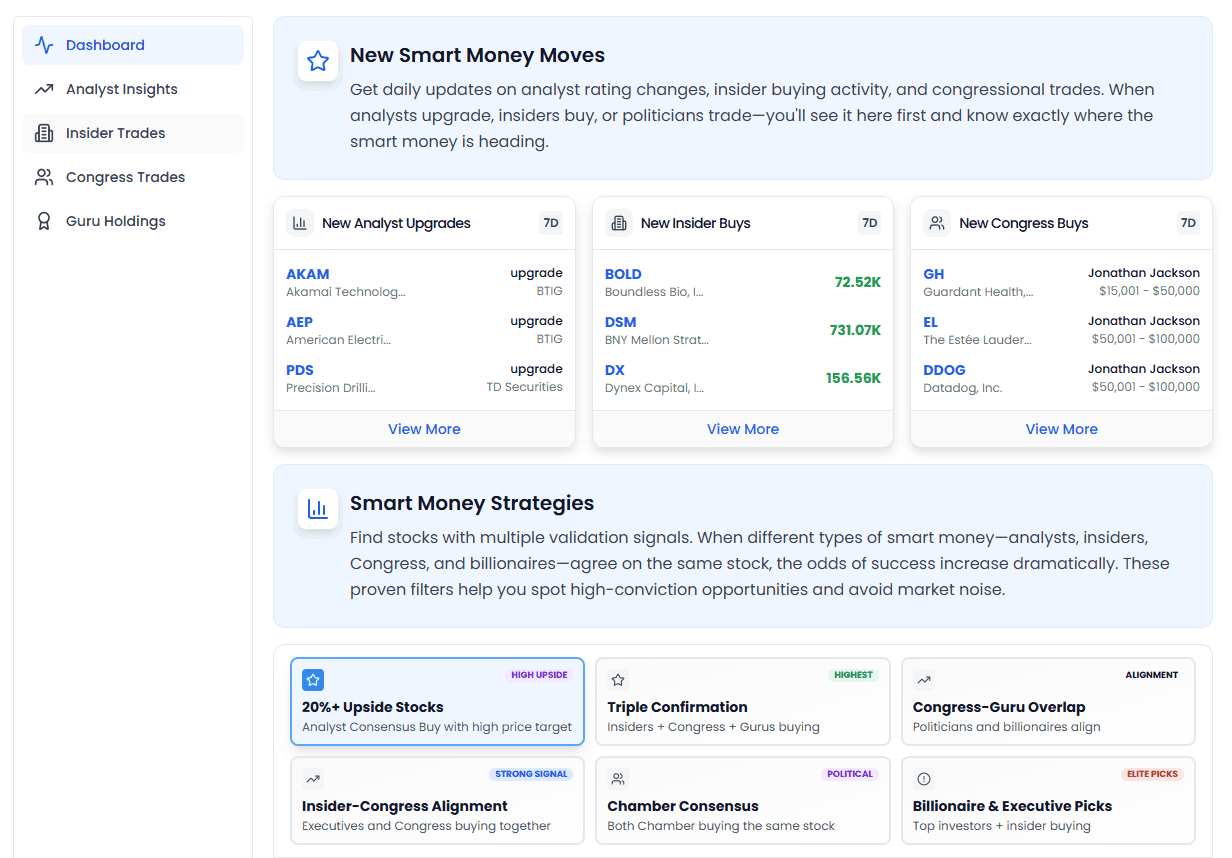
URL: https://www.kavout.com/smart-money/dashboard
One-liner: Daily briefing — master the latest smart money movements in 5 minutes
Module 1: Latest Movements (Last 7 Days)
Three cards side by side for a quick scan of the latest moves across the three major smart money categories in the past week.
① New Analyst Upgrades
- What to see: stocks upgraded by investment banks in the last 7 days
- How to use: quickly sense which companies have had positive rating changes recently
- Click "View More" to jump to the Analyst page for the full list
② New Insider Buys
- What to see: stocks bought with real money by company executives/directors in the last 7 days
- How to use: insider buying is a strong bullish signal — pay special attention to large buys
- Click "View More" to jump to the Insider Trades page
③ New Congress Buys
- What to see: stocks bought by U.S. members of Congress in the last 7 days
- How to use: congressional trades often act as policy wind vanes — watch the sectors they're heavy in
- Click "View More" to jump to the Congress Trades page
Module 2: Six Strategy Presets
This is the core essence of Smart Money. Each strategy is a set of "multi-source convergence" screening logic that automatically finds high-conviction picks for you.
Click a strategy card and the table below automatically switches to the corresponding results. Shows 5 by default; click "Show More" to see more (up to 20).
| Strategy | Badge | Screening Logic | Best For |
|---|---|---|---|
| 20%+ Upside Stocks | HIGH UPSIDE | Analyst consensus buy + 20%+ upside to target | Investors seeking high-alpha, undervalued picks |
| Triple Confirmation | HIGHEST | Insiders + Congress + Gurus all buying simultaneously | Conservative investors seeking high win rates who are willing to wait for opportunities |
| Congress-Guru Overlap | ALIGNMENT | Overlapping holdings between politicians and billionaires | Investors focused on policy plays who want medium-to-long-term allocation |
| Insider-Congress Alignment | STRONG SIGNAL | Company executives + members of Congress buying simultaneously | Investors who like insider signals and want policy-level validation on top |
| Chamber Consensus | POLITICAL | Senate + House buying simultaneously | Investors focused on bipartisan consensus and policy-certainty plays |
| Billionaire & Executive Picks | ELITE PICKS | Top investors + insiders buying simultaneously | Investors who want to copy top institutions with insider validation |
Quick tip: How to read Guru count colors?
- 🟣 Purple ≥30 Gurus holding → extremely high institutional consensus
- 🔵 Blue ≥20 → very high institutional consensus
- 🟢 Green ≥10 → relatively high institutional consensus
- ⚪ Gray <10 → fewer institutions watching
2. Analyst Insights
URL: https://www.kavout.com/smart-money/analyst-insights
One-liner: Track Wall Street analyst rating changes and find high-upside picks
When to Use This Page?
- Want to know which stocks analysts have upgraded/downgraded recently
- Want to find value stocks with 20%+ implied upside to target price
- Want to find analysts' top picks within specific sectors / market cap ranges
- Want to avoid stocks analysts are collectively bearish on (risk warning)
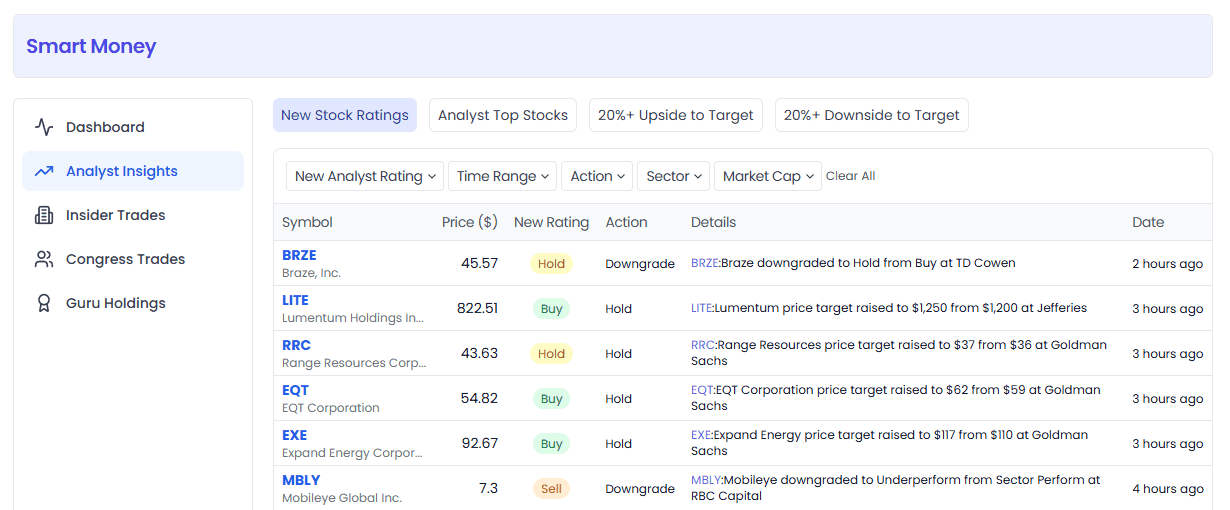
Top Quick Tabs
Click the top buttons to switch between different views:
| Tab | Description |
|---|---|
| New Stock Ratings | Default. Latest rating changes: initiations, upgrades, downgrades, etc. |
| Analyst Top Stocks | Stocks with the highest analyst consensus ratings |
| 20%+ Upside to Target | Auto-filters stocks with >20% upside |
| 20%+ Downside to Target | Auto-filters stocks with >20% downside (risk warning) |
Common Filter Combinations
You can stack these filters:
- Rating: Buy / Hold / Sell
- Action: Upgrade / Downgrade / Initialise / Maintain
- Upside/Downside: multiple tiers from "20%+" to "0-10%"
- Time Range: 24 hours / 7 days / 30 days / 90 days
- Sector: 11 sectors available (Technology, Healthcare, Finance, etc.)
- Market Cap: Mega / Large / Mid / Small / Micro
How to Read the Tables?
New Stock Ratings view:
| Column | Meaning |
|---|---|
| Symbol | Ticker + company name, click to jump to stock details |
| Price | Current stock price |
| New Rating | Latest rating (🟢 green = Buy / 🔵 blue = Hold / 🟠 orange = Sell) |
| Action | Type of action: Upgrade / Downgrade / Initialise / Maintain |
| Details | Specific change description, e.g. what rating changed to what |
| Date | Date of rating change |
Other views (Top Stocks / Upside / Downside):
| Column | Meaning |
|---|---|
| Symbol | Ticker + company name |
| Price | Current stock price |
| Price Target | Analyst price target (average across investment banks) |
| Upside/Downside | Upside/downside vs. target price (green for gains, red for losses) |
| Analyst Rating | Analyst consensus rating |
| Sector | Sector |
Usage Examples
Scenario 1: Finding undervalued large-cap tech stocks
You think tech stocks have momentum but want large-caps that analysts consider cheap
- Tab: 20%+ Upside to Target
- Filter Sector → Technology
- Filter Market Cap → Large Cap
- Result: large-cap tech stocks with 20%+ upside to target according to analysts
- Direct link
Scenario 2: See which stocks have been upgraded recently
Scan daily/weekly to capture short-term opportunities from rating changes
- Tab: New Stock Ratings
- Filter Action → Upgrade
- Filter Time Range → Last 7 Days
- Result: all stocks upgraded by analysts in the past week
- Direct link
Scenario 3: Avoid risk — stocks with 20%+ downside
Be alert about stocks in your portfolio; don't try to catch a falling knife
- Tab: 20%+ Downside to Target
- Result: stocks analysts think will fall another 20%+ — watch for risk
- Direct link
3. Insider Trades
URL: https://www.kavout.com/smart-money/insider-trades
One-liner: Follow the people who know the company best — CEOs and CFOs buying and selling with real money
When to Use This Page?
- Want to see what CEOs/CFOs — the people who know the company best — have been buying recently
- Want to find high-conviction picks where multiple executives are buying simultaneously (cluster buying)
- Want to avoid stocks with heavy insider selling (red flag signal)
- Want to stack analyst ratings for double validation
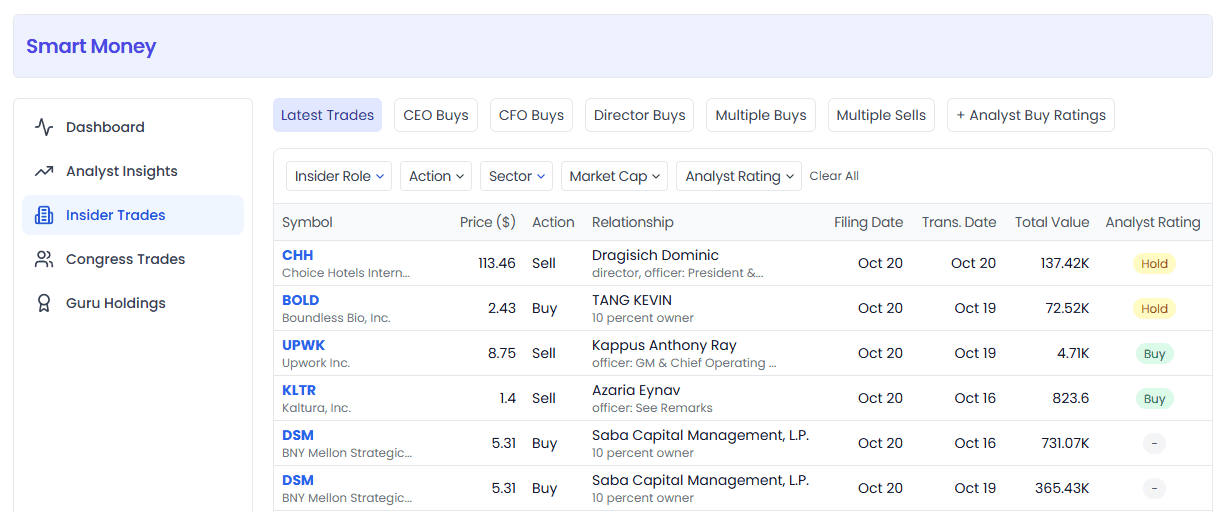
Top Quick Tabs
| Tab | Description | Signal Strength |
|---|---|---|
| Latest Trades | Default. All latest insider trades | — |
| CEO Buys | CEO buys only. CEOs know strategy best — strongest signal | ⭐⭐⭐⭐⭐ |
| CFO Buys | CFO buys only. CFOs know financial health best | ⭐⭐⭐⭐ |
| Director Buys | Director buys only | ⭐⭐⭐ |
| Multiple Buys | Multiple insiders buying simultaneously (cluster buying) | ⭐⭐⭐⭐⭐ |
| Multiple Sells | Multiple insiders selling simultaneously (red flag ⚠️) | Strong risk warning |
| + Analyst Buy Ratings | Insider buys + analysts also bullish — double confirmation | High conviction |
Common Filter Combinations
- Insider Role: CEO / CFO / COO / Director / 10% Owner / Officer
- Buy/Sell: Buy / Sell
- Time Range: 24 hours / 7 days / 30 days / 90 days
- Sector / Market Cap / Analyst Rating: same as other pages
How to Read the Tables?
Individual trade view (Latest / CEO / CFO / Director Buys):
| Column | Meaning |
|---|---|
| Symbol | Ticker + company name |
| Price | Current stock price |
| Action | 🟢 Buy / 🔴 Sell |
| Relationship | Insider name + title (e.g. CEO, Director, etc.) |
| Filing Date | Date filed with the SEC |
| Trans. Date | Actual transaction date |
| Total Value | Total transaction value (larger = more meaningful) |
| Analyst Rating | Analyst consensus rating |
Aggregate view (Multiple Buys/Sells / + Analyst Ratings):
| Column | Meaning |
|---|---|
| Symbol | Ticker + company name |
| Price | Current stock price |
| Market Cap | Market cap |
| Sector | Sector |
| Insiders | Number of insiders involved in the trade (more = stronger signal) |
| Total Value | Cumulative total transaction value |
| Analyst Rating | Analyst consensus rating |
Usage Examples
Scenario 1: See what CEOs have been buying recently
CEOs know their companies best — large buys are often a strong signal
- Tab: CEO Buys
- Sort by Total Value descending (click the header)
- Result: CEO buys sorted by value — focus on large buys of millions of dollars or more
- Direct link
Scenario 2: Find tech stocks with "cluster buying"
Multiple executives buying the same stock means widespread internal bullishness — extremely high conviction
- Tab: Multiple Buys
- Filter Time Range → Last 30 Days
- Filter Sector → Technology
- Result: tech stocks with multiple insider buys in the past 30 days
- Direct link
Scenario 3: Double confirmation — insiders + analysts both bullish
Insiders have information advantage, analysts have research depth — both bullish = more reliable
- Tab: + Analyst Buy Ratings
- Filter Analyst Rating → Buy
- Result: stocks with insider buys AND analyst buy ratings — double confirmation
- Direct link
4. Congress Trades
URL: https://www.kavout.com/smart-money/congress-trades
One-liner: See what members of Congress are buying and catch policy-driven opportunities early
When to Use This Page?
- Want to know what members of Congress have been buying recently (they may know policy direction in advance)
- Want to find bipartisan consensus picks that both chambers favor
- Want to stack insider data for double validation
- Follow the policy wind direction in a particular sector
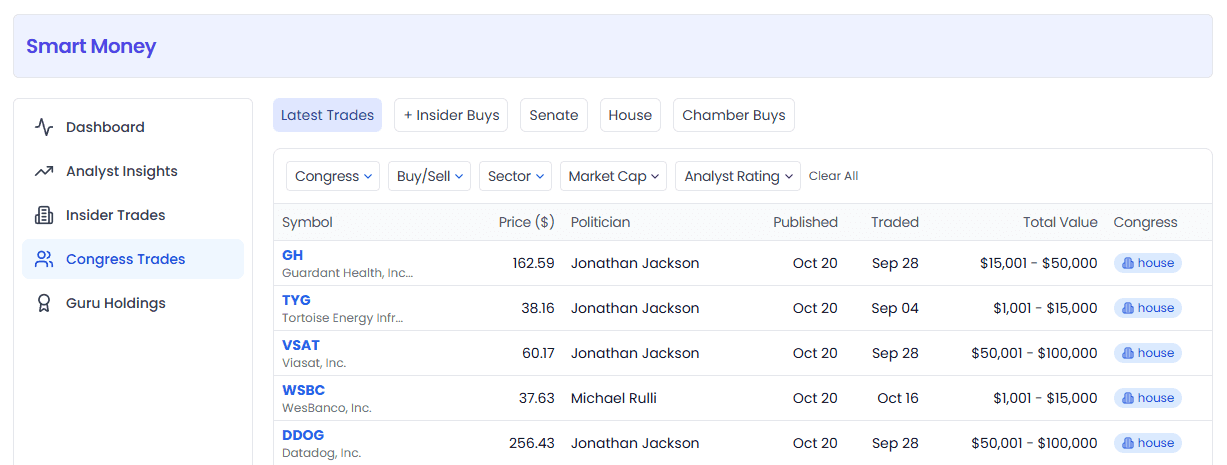
Top Quick Tabs
| Tab | Description |
|---|---|
| Latest Trades | Default. All latest congressional trades |
| + Insider Buys | Congress + insiders buying simultaneously — double confirmation |
| Senate | Senate member trades only |
| House | House member trades only |
| Chamber Buys | Both Senate and House buying — cross-chamber consensus, higher certainty |
Common Filter Combinations
- Chamber: Senate / House
- Buy/Sell: Buy / Sell
- Sector / Market Cap / Analyst Rating: same as other pages
- Time Range: 24 hours / 7 days / 30 days / 90 days
How to Read the Tables?
Individual trade view (Latest / Senate / House):
| Column | Meaning |
|---|---|
| Symbol | Ticker + company name |
| Price | Current stock price |
| Politician | Member of Congress name |
| Published | Trade disclosure date |
| Traded | Actual transaction date |
| Total Value | Total transaction value |
| Chamber | Chamber badge (Senate shield / House building icon) |
Aggregate view (Chamber Buys / + Insider Buys):
| Column | Meaning |
|---|---|
| Symbol | Ticker + company name |
| Price | Current stock price |
| Market Cap / Sector | Market cap / sector |
| Members | Number of members of Congress involved |
| Insiders | Number of insiders buying (+ Insider Buys view only) |
| Rating | Analyst rating (+ Insider Buys view only) |
| Total Value | Cumulative total transaction value |
Usage Examples
Scenario 1: Following Senate trading movements
The Senate is smaller and more influential — every senator's trade is worth watching
- Tab: Senate
- Filter Buy/Sell → Buy
- Result: list of stocks recently bought by senators
- Direct link
Scenario 2: Find high-certainty "both chambers buying" picks
Both Senate and House buying simultaneously means cross-party, cross-chamber bullishness — stronger policy certainty
- Tab: Chamber Buys
- Result: list of stocks bought by both chambers of Congress
- Direct link
Scenario 3: Policy + insider double validation
Congress buying + company executives also buying — policy expectations + fundamentals both supportive
- Tab: + Insider Buys
- Filter Analyst Rating → Buy (stacking analysts makes it even more solid)
- Result: picks favored by Congress, insiders, and analysts — all three bullish
- Direct link
5. Guru Holdings
URL: https://www.kavout.com/smart-money/guru-holdings
One-liner: Copy the investment playbook of billionaires and top funds
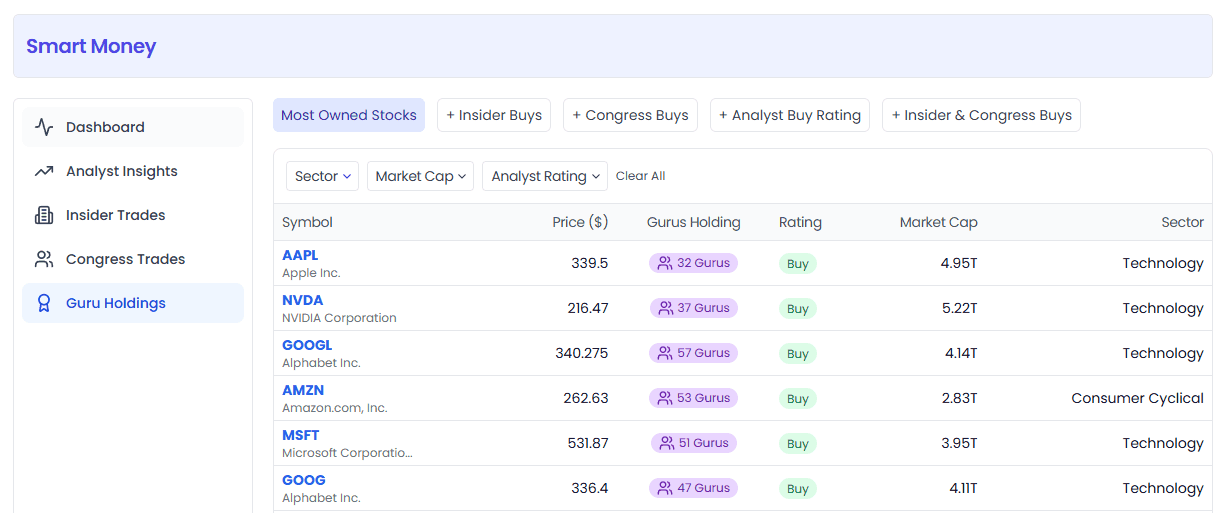
When to Use This Page?
- Want to know what stocks billionaires and top funds are holding
- Want to find high-consensus picks held by the most institutions simultaneously
- Want triple validation: Guru + Insider + Congress all bullish (highest conviction)
- Want to see how top investors are positioned in a given sector
Top Quick Tabs
| Tab | Description | Recommendation |
|---|---|---|
| Most Owned Stocks | Default. Stocks held by the most Gurus (highest institutional consensus) | ⭐⭐⭐ |
| + Insider Buys | Guru holdings + insider buying (double confirmation) | ⭐⭐⭐⭐ |
| + Congress Buys | Guru holdings + Congress buying (double confirmation) | ⭐⭐⭐⭐ |
| + Analyst Buy Rating | Guru holdings + analyst buy rating | ⭐⭐⭐ |
| + Insider & Congress Buys | Triple confirmation: Guru + Insider + Congress — highest conviction | ⭐⭐⭐⭐⭐ |
Common Filter Combinations
- Sector / Market Cap / Analyst Rating: same as other pages
- Time Range: 24 hours / 7 days / 30 days / 90 days (for views involving Insider/Congress)
How to Read the Table?
All views include these base columns:
| Column | Meaning |
|---|---|
| Symbol | Ticker + company name, click to jump to stock details |
| Price | Current stock price |
| Gurus Holding | Number of Gurus holding the stock (colored badge) 🟣 Purple ≥30 · 🔵 Blue ≥20 · 🟢 Green ≥10 · ⚪ Gray <10 |
| Rating | Analyst consensus rating |
| Market Cap | Market cap |
| Sector | Sector |
Depending on the view selected, additional validation columns appear:
- + Insider Buys → adds an "Insiders" column (number of insiders buying)
- + Congress Buys → adds a "Congress" column (number of members of Congress buying)
- + Insider & Congress Buys → adds both columns — triple validation
Usage Examples
Scenario 1: Finding tech stocks with the highest institutional consensus
Stocks held by 30+ top funds are well-researched by institutions — lower chance of blowups
- Tab: Most Owned Stocks
- Filter Sector → Technology
- Sort by Gurus Holding descending
- Result: list of the most popular tech stocks among top institutions
- Direct link
Scenario 2: Highest conviction — triple confirmation picks
Billionaires bought, executives bought, and members of Congress bought. Three completely different types of smart money all bullish simultaneously — the most noteworthy opportunities
- Tab: + Insider & Congress Buys
- Filter Time Range → Last 90 Days
- Filter Analyst Rating → Buy
- Result: list of high-conviction picks with triple resonance (usually not too many — each one deserves serious study)
- Direct link
Scenario 3: Large-cap stocks with policy + capital double resonance
Both members of Congress and billionaires are buying — policy expectations and fundamental research align
- Tab: + Congress Buys
- Filter Market Cap → Large Cap (large-caps only, good liquidity)
- Result: large-cap stocks where Guru holdings and Congress buys overlap
- Direct link
General Usage Notes
Filtering & Sharing
- All filter conditions are automatically synced to the browser address bar
- You can bookmark or share the URL with friends — it opens with the same filtered results
- Browser back/forward buttons navigate through filter history
Table Operations
- 20 rows of data per page, with page navigation at the bottom
- Click column headers to sort by that column (toggle ascending/descending)
- Click a ticker symbol to jump to the stock details page for deeper research
Dark Mode
- Automatically switches between light and dark themes following the system
FAQ
How often is the data updated?
Different data sources update at different frequencies:
- Analyst Ratings: real-time updates, synced within hours of a new rating release
- Insider Trades: synced after SEC disclosure, typically 1-3 business days after the trade
- Congress Trades: synced after member disclosure — disclosure may lag the trade by weeks
- Guru Holdings: based on 13F filings, updated quarterly (within 45 days of quarter end)
Is the data accurate? Can I just copy trades directly?
The data comes from public disclosures (SEC 13F, Form 4, House public reports, etc.) — we present it as is, but it does not constitute investment advice:
- Smart money can be wrong too; past performance does not guarantee future results
- Insider selling isn't necessarily bearish — it could be for personal reasons like cashing out, taxes, divorce, etc.
- Guru holdings are quarterly data — they may have already sold by the time you see it
- Please make decisions based on your own research and judgment
Why do some stocks with high Guru counts keep dropping in price?
Guru count represents the degree of institutional consensus, not short-term price movement. Even top investors can get stuck — their holding periods are typically 2-5 years or longer. Guru data is best used as a starting point for long-term research, not a short-term trading signal.
Are all insider "Buys" bought with their own money?
Most are real-money purchases, but a small number come from option exercises. Our data reflects the transaction types as disclosed by the SEC. Large option exercises are also worth watching — they show insiders are willing to hold the stock rather than sell immediately.
Why is congressional trade disclosure so slow?
Under the U.S. STOCK Act, members of Congress must disclose trades within 45 days. So the congressional trades you see may already be a month or two old. Mind the timeliness — don't blindly chase highs.
Which module should I focus on?
There's no standard answer — it depends on your investment style:
- Value investors → focus on Guru Holdings + Analyst Insights
- Growth / event-driven → focus on Insider Trades + Analyst Upgrades
- Macro / policy-oriented → focus on Congress Trades + Guru Holdings
- Beginners → start with the Dashboard's six strategies to find multi-source convergence picks
Appendix: URL Parameter Reference
Advanced users can construct filtered links directly through URL parameters. All parameters are optional. Separate multiple values with commas.
General Parameters
| Parameter | Description | Example |
|---|---|---|
filter_type | View/tab type | new-stock-ratings |
sector | Sector | Technology,Healthcare |
market_cap | Market cap | large,mid |
analyst_rating | Analyst rating | Buy |
Analyst Insights Specific
| Parameter | Description | Possible Values |
|---|---|---|
action | Action type | Upgrade / Downgrade / Initialise / Hold |
upside | Upside/downside range | upside-20-plus / upside-10-20 / upside-0-10 / downside-0-10 / downside-10-20 / downside-20-plus |
time_range | Time range | 24h / 7d / 30d / 90d |
Insider Trades Specific
| Parameter | Description | Possible Values |
|---|---|---|
insider_role | Insider role | ceo / cfo / coo / director / ten-pencent-owner / officer / other |
buy_sell / action | Buy/Sell | Buy / Sell |
time_range | Time range | 24h / 7d / 30d / 90d |
Congress Trades Specific
| Parameter | Description | Possible Values |
|---|---|---|
congress | Chamber | Senate / House |
buy_sell | Buy/Sell | Buy / Sell |
time_range | Time range | 24h / 7d / 30d / 90d |
Guru Holdings Specific
| Parameter | Description | Possible Values |
|---|---|---|
time_range | Time range | 24h / 7d / 30d / 90d |
Screenshots in this article: Actual product UI as of August 2026. For feedback or questions, reach out to our team anytime.
Smart Signals
72 technical signals with real-time scanning and a custom screener — Trend, Momentum, Volatility, and Volume signal categories to catch every trading opportunity
Market Calendar
Your all-in-one financial calendar — earnings, dividends, economic data, IPOs, holidays — all the important dates that move markets in one place.